Red Hat OpenShift (Do380) Career In 2026!

Introduction: Growth of Cloud Platforms

By 2026, companies are not just testing containers. They are running important business systems on Kubernetes platforms. Many companies now use automation, GitOps, and large cluster management.

This is where Red Hat and Red Hat OpenShift become very important.

DO280 teaches basic administration.
DO380, which is Red Hat OpenShift Administration III: Scaling Deployments in the Enterprise, teaches automation and large scale management.

Red Hat Openshift

In 2026, DO380 is not just an advanced course. It can strongly improve your career.

What Is DO380?

DO380 is for people who already know OpenShift basics and want to manage large and automated environments.

It does not focus on:

  • Basic cluster work
  • Manual setup
  • Simple app deployment

Instead, DO380 teaches you to:

  • Automate OpenShift tasks
  • Manage many clusters
  • Use GitOps methods
  • Connect CI CD at platform level
  • Use advanced operators

In 2026, manual work is not enough. Automation is required.

Why DO380 Is Important in 2026

1. Companies Are Using More Kubernetes

Many companies now run:

  • Hybrid cloud systems
  • Many production clusters
  • Banking and healthcare systems
  • AI and GPU applications

Managing one cluster is not enough anymore.

Companies need experts who can manage many clusters in different locations.
DO380 prepares you for this.

2. Automation and GitOps Are Common

In 2026, companies use:

  • Git based deployments
  • Infrastructure as Code
  • Declarative configuration
  • Automatic cluster management

DO380 teaches how to:

  • Use Git for deployment
  • Use operators for automation
  • Keep systems updated automatically

Engineers who know automation are more valuable than engineers who only write YAML files.

Skills You Learn in DO380

After completing DO380, you can:

  • Use GitOps workflows
  • Deploy and manage OpenShift operators
  • Automate cluster settings
  • Manage different environments
  • Set up advanced networking
  • Scale workloads
  • Handle large upgrades

These are advanced skills. These skills are used in platform engineering.

DO280 vs DO380 Career Difference

DO280 vs DO380

DO280 focuses on:

  • Cluster administration
  • Troubleshooting
  • RBAC, storage, networking
  • Keeping systems stable

DO380 focuses on:

  • Automation
  • Scaling
  • GitOps
  • Operators
  • Platform strategy

DO280 makes you an OpenShift Administrator.
DO380 helps you become a Platform Engineer.

In 2026, platform engineering jobs are growing faster than traditional system admin jobs.

Career Opportunities in 2026

With DO380 knowledge, you can apply for roles like:

  • Senior OpenShift Administrator
  • Platform Engineer
  • DevOps Automation Engineer
  • Site Reliability Engineer
  • Cloud Infrastructure Architect

Industries hiring OpenShift experts:

  • Banking
  • Telecom
  • Healthcare
  • Government
  • Retail and manufacturing

Countries with strong demand:

  • India
  • Germany
  • United States
  • Middle East

Salary in 2026

Approximate salaries:

India: 18 to 35 LPA
Europe: 75,000 to 110,000 Euro
United States: 125,000 to 170,000 USD

Automation experts earn more because they reduce downtime and save company costs.

Hybrid Cloud and AI

Modern companies use:

  • On prem data centers
  • Public cloud
  • Edge systems

OpenShift helps run applications on all these platforms in the same way.

In 2026:

  • AI apps run in containers
  • GPU nodes are managed with Kubernetes
  • Resources are managed automatically

DO380 helps you manage these large systems.

Who Should Learn DO380?

DO380 is good for:

  • OpenShift admins who finished DO280
  • Kubernetes admins who want enterprise skills
  • DevOps engineers
  • SRE professionals
  • Cloud engineers

Freshers should first learn Linux and Kubernetes basics before doing DO380.

Certification Benefit

DO380 matches advanced OpenShift certifications from Red Hat.

Red Hat exams are practical. You must:

  • Configure systems live
  • Fix real problems
  • Work in real time

There are no multiple choice questions.

This makes the certification respected by companies.

Why DO380 Is a Smart Choice in 2026

DO380 career in 2026

Companies in 2026 do not only want engineers who know:

  • Basic kubectl commands
  • Simple YAML
  • Cloud dashboards

They want engineers who can:

  • Automate full platforms
  • Manage many clusters
  • Reduce downtime
  • Secure systems
  • Connect CI CD with infrastructure

DO380 trains you for these responsibilities.

For Content Creators and Trainers

If you create DevOps or Kubernetes content, talking about DO380 can:

  • Show you as an enterprise expert
  • Attract serious learners
  • Build trust in the OpenShift field

Advanced topics help build long term authority.

Conclusion

Is DO380 mandatory in 2026?

It may not be officially required. But in real jobs, it is very important.

As companies grow their OpenShift systems, they need experts who understand:

  • Automation
  • Governance
  • Multi cluster management
  • GitOps
  • Large scale systems

If you want to move from ba sic DevOps to platform engineering, DO380 is a strong step for your career.

FAQs
  1. Is DO380 difficult?
    Yes, it is advanced. You must know OpenShift basics.
  2. Should I complete DO280 first?
    Yes. DO280 builds your base knowledge.
  3. Is DO380 better than learning Kubernetes only?
    Kubernetes gives basics. DO380 teaches enterprise level skills.
  4. Is OpenShift used globally?
    Yes. It is used in many industries across the world.
  5. Does DO380 help in DevOps careers?
    Yes. It prepares you for automation focused DevOps and platform engineering jobs.


Why Learning OpenShift (DO280) Is Mandatory in 2026!

Red Hat OpenShift Administration II (DO280)

Introduction – The Move to Kubernetes-Based Systems

In 2026, most companies run their applications in containers.
Virtual machines are still used, but containers and Kubernetes are now the main choice.

From banks to hospitals, from telecom companies to AI startups, everyone needs a secure and stable container platform.

Red Hat created Red Hat OpenShift to make Kubernetes easier and safer for big companies. It adds security, user control, monitoring, updates, and many enterprise tools.

Learning Red Hat OpenShift Administration II (DO280) is not optional in 2026. It matches real production work in companies.

2026 Market Demand for OpenShift Administrators

ChatGPT Image Feb 26 2026 05 49 00 PM

Today, companies do not just say “We use Kubernetes.”
They say “We use OpenShift.”

OpenShift is widely used in:

  • Banking companies
  • Telecom companies
  • Healthcare systems
  • Government projects
  • Manufacturing and retail companies

In countries like India, Germany, the US, and Middle East nations, many companies use OpenShift for hybrid cloud setups because of security and data rules.

Common Job Roles in 2026:

  • OpenShift Administrator
  • Platform Engineer
  • Site Reliability Engineer (SRE)
  • DevOps Engineer
  • Cloud Infrastructure Engineer

Many job posts now ask for DO280-level skills, not just basic Kubernetes knowledge.

Why DO280 Is More Practical and Industry-Focused

ChatGPT Image Feb 26 2026 05 50 38 PM

DO280 is not a beginner course.
It teaches how to manage real production clusters.

You learn how to:

  • Manage multi-node OpenShift clusters
  • Set up networking and ingress
  • Configure user access (RBAC)
  • Manage storage and volumes
  • Monitor cluster health
  • Fix real deployment problems
  • Handle cluster upgrades

There is a big difference between:

  • Someone who watched YouTube tutorials
  • Someone who completed DO280 training

During system failure or outage, companies need experts who can fix issues fast.

In 2026, companies hire people who can keep systems running — not just deploy pods.

Basic Requirements for DO280

Before starting DO280, you should know:

  • Basic Linux commands
  • Container basics (Docker or Podman)
  • Kubernetes fundamentals
  • Knowledge similar to OpenShift Administration I (DO180)

If you already work with YAML and kubectl, DO280 will take you deeper into real operations.

OpenShift vs Basic Kubernetes

ChatGPT Image Feb 26 2026 05 52 27 PM

Kubernetes gives you basic understanding.
OpenShift gives you enterprise-level responsibility.

Kubernetes includes:

  • Pods
  • Services
  • Deployments
  • ReplicaSets

OpenShift includes:

  • Cluster Operators
  • Security Context Constraints (SCC)
  • Built-in registry
  • OAuth login system
  • Image streams
  • Built-in CI/CD tools

Most big companies do not install plain Kubernetes manually.
They use supported platforms like OpenShift.

OpenShift admins handle:

  • Security
  • Patching
  • Upgrades
  • Compliance
  • System monitoring

That is why DO280 is important.

Salary and Career Growth in 2026

OpenShift admins earn more than general system admins because they manage critical systems.

Approximate salary range in 2026:

  • India: ₹12 to 28 LPA
  • Europe: €65,000 to €95,000 per year
  • United States: $110,000 to $150,000 per year

Platform engineering jobs are growing fast.
Many DevOps engineers are moving into OpenShift roles.

If you run a tech YouTube channel, creating content about DO280 can help you stand out as a Kubernetes platform expert.

Hybrid Cloud and AI in 2026

Today, companies use hybrid cloud. That means they run apps in:

  • On-premise data centers
  • Public cloud (AWS, Azure, GCP)
  • Edge locations

OpenShift supports hybrid setups.

AI workloads also run in containers now.
OpenShift helps manage:

  • Resource usage
  • GPU scheduling
  • Multi-team access control
  • Automation

DO280 prepares you to manage real production clusters, not just test apps.

Real Skills You Learn in DO280

DO280 teaches you how to:

  • Upgrade clusters safely
  • Manage networking
  • Secure applications
  • Control user access
  • Fix performance issues
  • Handle node failures
  • Manage storage safely

These are real job responsibilities.
When systems go down, companies lose money.
DO280-trained admins reduce that risk.

Why Beginners Should Not Ignore DO280

Many beginners focus only on:

  • Cloud provider certificates
  • Basic Kubernetes tutorials
  • DevOps tools

This gives only surface knowledge.

DO280 gives deep infrastructure skills.
Even if you are new, learning enterprise container platforms gives long-term career stability.

Cloud tools change fast.
Platform administration remains important because companies depend on it daily.

Who Should Learn DO280 in 2026?

  • Linux administrators moving to DevOps
  • Kubernetes admins wanting enterprise knowledge
  • Cloud engineers working on hybrid cloud
  • Platform engineers
  • SRE professionals
  • IT professionals in companies using OpenShift

Freshers with strong Linux and Kubernetes basics can also learn it.

Certification

After DO280 training, you can take the certification exam:

Red Hat Certified OpenShift Administrator

Red Hat exams are performance-based.
You work on real systems during the exam.
There are no multiple-choice questions.

That is why Red Hat certifications are respected.

Why Choose KR Network Cloud for Training

KR Network Cloud offers training based on DO280 topics.

Benefits include:

  • Live lab practice
  • Real troubleshooting scenarios
  • Hybrid cloud setup practice
  • Exam guidance
  • Industry-based projects

For Indian learners aiming for enterprise DevOps jobs, structured OpenShift training helps move from theory to real work faster.

Conclusion – Why DO280 Is “Mandatory” in 2026

OpenShift is now a common enterprise Kubernetes platform.
Hybrid cloud and AI systems need strong cluster management.

DO280 teaches those real skills.

In 2026, companies do not hire people who only know YAML.
They hire people who can manage and fix production systems.

If you want a career in DevOps, platform engineering, or cloud operations, DO280 matches market demand. And Kr Network Cloud is the best choice for DO280.

FAQs
  1. Is DO280 difficult?
    It is practical and lab-based. If you know Linux and Kubernetes basics, you can learn it.
  2. Is DO280 better than learning Kubernetes alone?
    Kubernetes is basic knowledge. DO280 teaches how to manage it in real companies.
  3. Can freshers learn DO280?
    Yes, if they have good Linux and container basics.
  4. Is OpenShift used outside India?
    Yes. It is used in North America, Europe, and Asia.
  5. Does DO280 help in DevOps jobs?
    Yes. Many DevOps and platform roles need OpenShift skills.

AWS Cloud Architect Is a Great Career Choice in 2026!

Cloud computing is now used everywhere. Banks, hospitals, media companies, government offices, delivery companies, and small shops all use cloud services. It is no longer only for big tech companies.

Among many cloud certificates, the AWS Certified Solutions Architect – Associate (also called AWS Cloud Architect Associate) is one of the best choices for 2026.

This certificate teaches you how to design strong, safe, and cost-saving systems on AWS. If you want a long-term career in cloud technology, this certification can open many job opportunities.

aws cloud architech associate

What You Learn in AWS Cloud Architect Associate

The current exam version is called SAA-C03. It does not just test memory. It tests how you think and solve problems.

You learn how to:

  • Design systems with different layers
  • Choose between EC2, Lambda, or containers
  • Build systems that do not fail easily
  • Use services like EC2, S3, RDS, VPC, IAM, and CloudFront
  • Reduce cost while keeping good performance

For example, if a company website crashes when many users visit, you should know whether to use Auto Scaling, Load Balancer, or a serverless setup.

This type of thinking makes you a cloud architect, not just someone who runs servers.

Why 2026 Is a Good Time for Cloud Careers

More companies are moving their work to the cloud. Many old systems are being moved to AWS. At the same time, new apps are being built in the cloud.

In 2024 and 2025, many companies started moving to cloud services. By 2026, they need skilled people who can design strong systems.

AWS is still one of the biggest cloud providers in the world. Services like:

  • Amazon EC2
  • Amazon S3
  • Amazon RDS
  • AWS Lambda
  • Amazon VPC

are used by many companies.

Companies need experts who understand security, networking, storage, and cost control together.

Why Architecture Skills Are Important

aws cloud architeture skills
aws cloud architech associate

There is a big difference between using a tool and designing a system.

For example:

  • Should you run a database on EC2 or use Amazon RDS?
  • Should you use ECS or EKS for containers?
  • Should you store data in S3 Standard or Glacier?

A cloud architect makes these decisions based on cost, speed, safety, and company needs.

Because of this skill, you can get roles like:

  • Cloud Architect
  • Solutions Architect
  • Cloud Consultant
  • Infrastructure Engineer
  • Cloud Migration Specialist

These roles help design systems from the beginning.

Salary and Job Demand

Cloud architect jobs usually pay well.

In India, AWS architects often earn more than traditional system administrators. In the US and Europe, salaries can go above six figures per year, depending on experience.

Many job listings mention AWS certification as required or preferred. Certification helps your resume stand out.

But remember: certification alone is not enough. You must also practice and build real projects.

Simple Example

Imagine a startup company that creates a mobile payment app. At first, it has 50,000 users. After two years, it has 2 million users.

If the system is not designed well, it will crash when many users log in at the same time.

An AWS architect would design:

  • EC2 instances with Auto Scaling
  • Load Balancer
  • Multi-AZ RDS database
  • S3 for file storage
  • IAM for security
  • CloudWatch for monitoring

This keeps the system safe and stable. This is why companies hire architects.

Exam Topics and Study Path

The exam covers four main areas:

  • Secure systems
  • Strong and reliable systems
  • High performance systems
  • Cost-saving systems

Most people take 2 to 4 months to prepare.

A simple study plan:

  • Learn basic networking and Linux
  • Create a free AWS account
  • Build small projects
  • Create VPC, subnets, and security groups
  • Launch EC2 and connect to RDS
  • Practice IAM permissions

Doing real practice is more important than just watching videos.

Future of Cloud Architecture
Future of Cloud Architeture

Cloud jobs are growing fast. Now it includes:

  • Serverless computing
  • Containers
  • Data systems
  • AI and machine learning services
  • Event-based systems

AWS keeps adding new services. So learning never stops.

In 2026, companies will still depend on cloud services. Data is growing. Online services are growing. Cloud skills will stay important.


Is This Good for Freshers?

Yes, freshers can do it. But basic knowledge of:

  • Linux
  • Networking
  • Basic coding

will help a lot.

If you already work as:

  • System Administrator
  • Network Engineer
  • DevOps Engineer
  • IT Support

this certification can help you move into cloud roles faster.

What After This Certification?

After AWS Cloud Architect Associate, you can go for:

  • AWS Solutions Architect – Professional
  • DevOps Engineer – Professional
  • Security or Networking specialty certificates

It gives you a clear growth path.

Final Words

AWS Cloud Architect Associate is a strong career choice for 2026.

It teaches you how to design real systems, not just manage servers.

The certificate helps you start. Real practice and projects help you grow.

If you want to build systems instead of only maintaining them, AWS cloud architecture can give you a stable and rewarding career path.

Azure DevOps vs GitHub: What’s the Difference for Beginners?

Azure DevOps vs GitHub: What’s the Difference for Beginners?

If you are starting your DevOps journey, one question appears almost immediately. which one should you learn first?

At first glance, both look similar. Both manage code. Both support automation. Both are owned by Microsoft. However, once you start exploring real projects, you begin to see clear differences.

Therefore, this Azure DevOps vs GitHub guide will break everything down in simple terms.
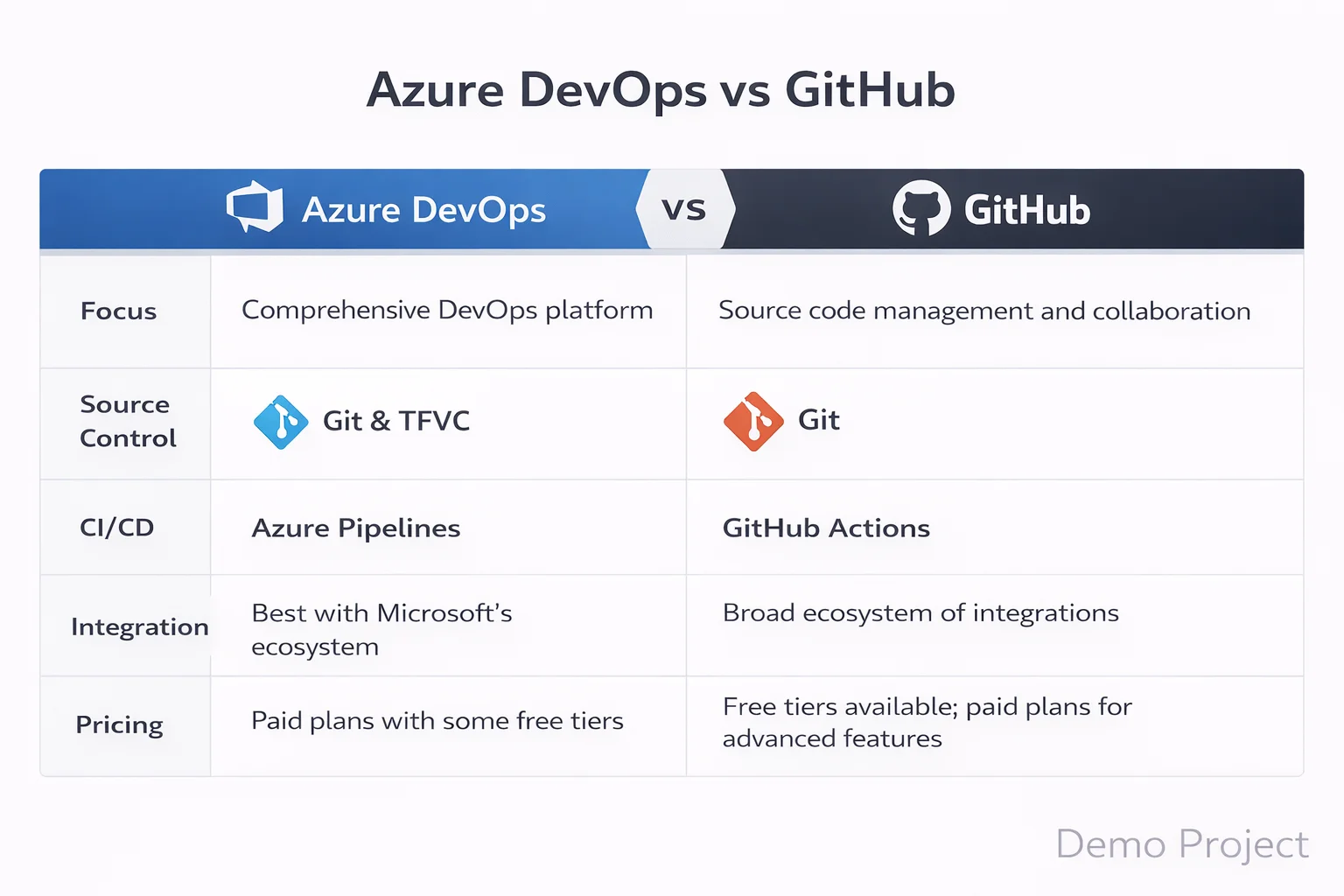
Azure DevOps vs GitHub Platform Overview Comparison

Instead of pushing one tool, we will focus on clarity. Because beginners do not need hype. They need direction.

Why Azure DevOps vs GitHub Confuses Beginners

Many aspiring DevOps engineers understand Git basics. Some even use cloud platforms. However, when they search Azure DevOps vs GitHub comparison 2026, they see technical blogs full of jargon.

As a result, confusion increases.

So let us simplify the difference between Azure DevOps and GitHub using practical context.

Imagine you are joining a startup. You mainly push code, create pull requests, and run simple automation. In that case, GitHub may feel natural.

Now imagine you are joining a large corporate IT company. There are sprint boards, approval flows, compliance checks, and structured releases. In that case, Azure DevOps may fit better.

That is the first practical difference.

What is Azure DevOps?

Azure DevOps is a complete DevOps platform. If you want a deeper foundational explanation, this detailed guide on what is azure devops beginner guide 2026 explains how the platform fits into modern CI/CD environments. It includes tools for planning, coding, testing, and releasing software.

When we talk about Azure DevOps vs GitHub features explained, Azure DevOps includes:

  • Azure Boards for project tracking
  • Azure Repos for version control
  • Azure Pipelines for automation
  • Azure Test Plans
  • Azure Artifacts

Because everything is integrated, enterprise teams prefer structured workflows.
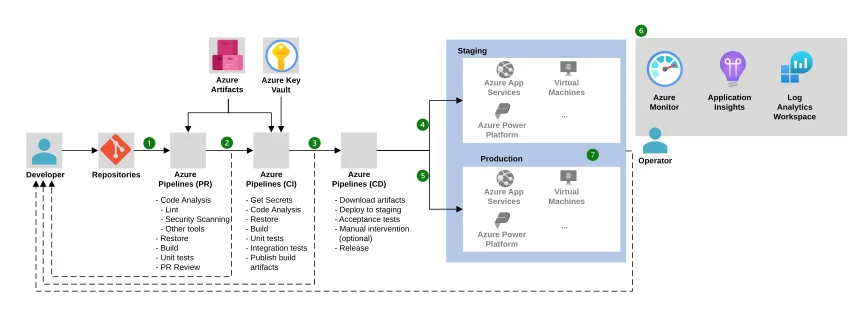
Azure DevOps Components Architecture

Therefore, in Azure DevOps vs GitHub project management, Azure DevOps clearly offers deeper control.

What is GitHub?

GitHub started as a code hosting platform. Over time, it added automation, collaboration, and security tools.

GitHub can be understood as a developer first platform. It focuses on:

  • Git based repositories
  • Pull requests and reviews
  • Open source collaboration
  • Automation through GitHub Actions

Because it feels lightweight, Azure DevOps vs GitHub for beginners often leans toward GitHub at the early stage.
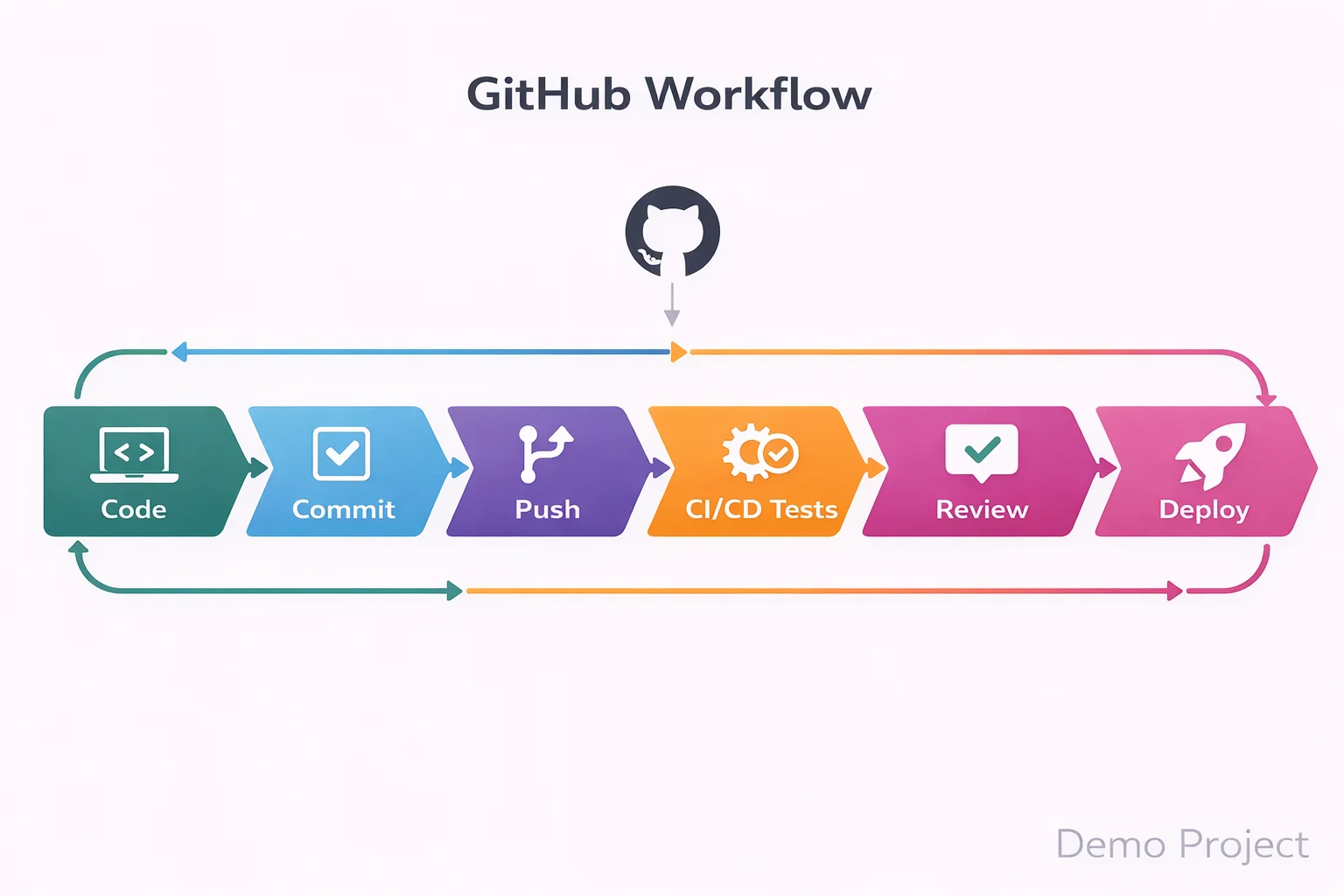
GitHub Workflow with Pull Requests and GitHub Actions

However, that does not mean it is less powerful.

Azure DevOps vs GitHub Version Control Differences

Let us begin with source control.

In Azure DevOps vs GitHub version control differences, both use Git. However, Azure DevOps also supports TFVC, which some legacy enterprises still use.

Therefore, if you aim for enterprise IT roles, Professionals may require understanding Azure Repos.

If you aim for enterprise IT roles, professionals may require understanding Azure Repos along with strong fundamentals covered in linux system admin in 2026

On the other hand, GitHub is fully Git based and widely used in open source communities.

For most beginners, GitHub feels easier. However, enterprise teams may expect Azure DevOps knowledge.

Azure DevOps vs GitHub CI/CD Comparison

Automation is central to DevOps.

Automation is central to DevOps. Infrastructure automation tools such as those discussed in red-hat-ansible-in-2026 also play a major role in enterprise DevOps environments.

In Azure DevOps vs GitHub CI/CD comparison, Azure DevOps uses Azure Pipelines. GitHub uses GitHub Actions.

Azure Pipelines offer advanced customization, multi stage approvals, and complex enterprise workflows.

GitHub Actions, however, are simpler to start. They use YAML files and marketplace actions.

So in Azure and CI/CD pipelines comparison, beginners often find GitHub Actions easier to configure first.

However, in large companies, Azure DevOps pipelines may provide more granular control.
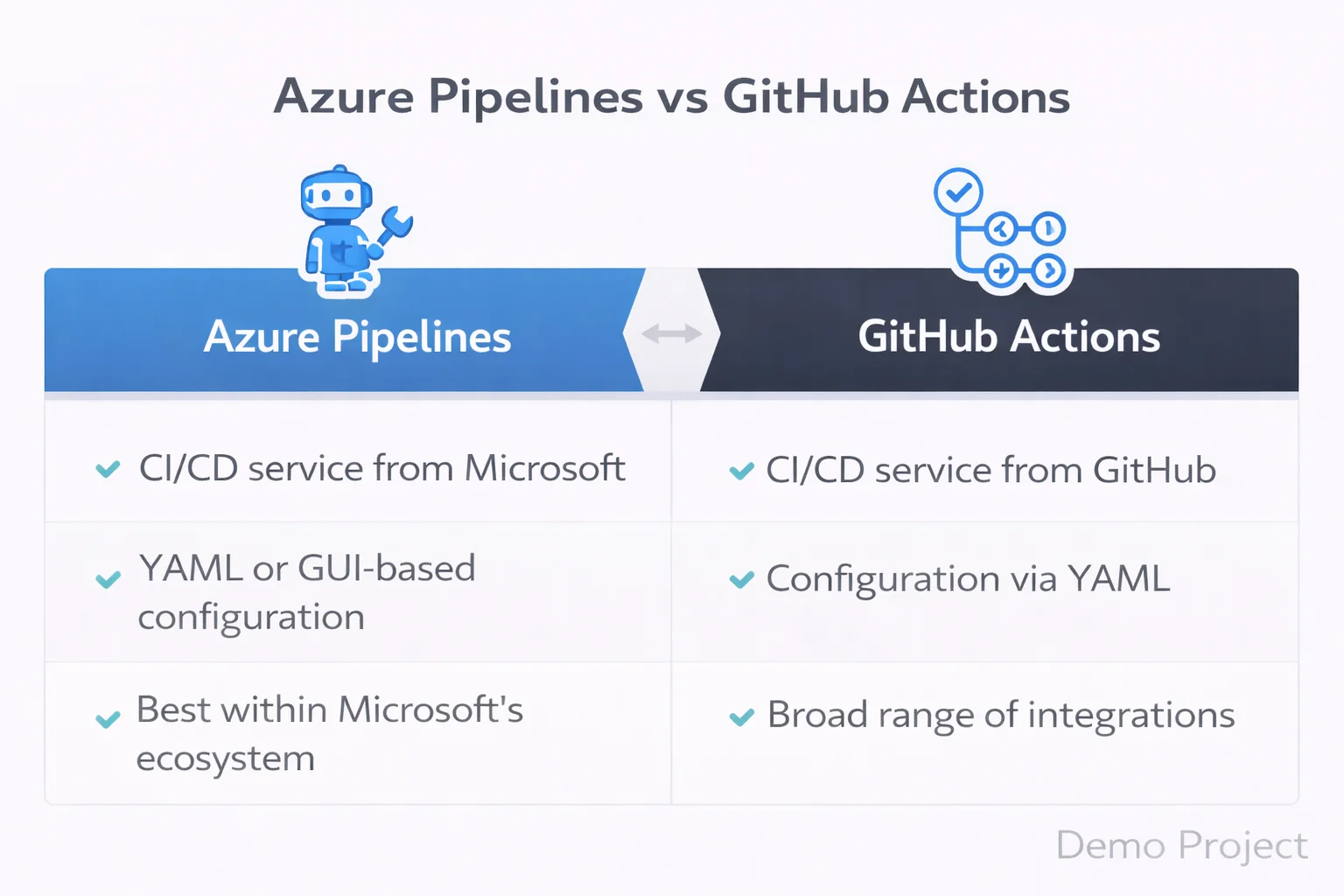
CICD Pipeline Comparison Azure Pipelines vs GitHub Actions

Azure DevOps vs GitHub Actions

Many beginners confuse Azure DevOps vs GitHub actions.

GitHub Actions is the automation engine inside GitHub. Azure DevOps pipelines serve a similar purpose.

If you want quick automation for a personal project, GitHub Actions work well.

If you need deep enterprise release management, Azure Pipelines may offer stronger structure.

Therefore, Azure DevOps vs GitHub vs GitHub Actions becomes a discussion about scale and control.

Azure DevOps vs GitHub Project Management

Project management is where a big difference appears.

Azure DevOps includes advanced Agile boards, sprint planning, backlog tracking, and reporting.

GitHub provides project boards, but they are simpler.

So in Azure DevOps vs GitHub project management, Azure DevOps clearly targets enterprise Agile environments.

If you plan to work in structured corporate IT, this matters.

Azure DevOps vs GitHub Security and Scalability

Security is not optional anymore.

In this security and scalability, both platforms provide enterprise level features. However, Azure DevOps often integrates deeply with Microsoft identity systems.

Meanwhile, GitHub provides strong security scanning and secret detection.

Therefore, the difference between Azure DevOps and GitHub here depends on your company ecosystem.

If your company runs heavily on Microsoft Azure, Azure DevOps may integrate more smoothly.

Azure DevOps vs GitHub Workflows

Let us look at daily workflows.

In workflows, GitHub feels developer centered. Developers push code, open pull requests, and trigger automation quickly.

Azure DevOps workflows often involve structured approvals, QA checks, and staged releases.

So Azure DevOps vs GitHub use cases differ based on team size.

Startups prefer speed and simplicity. Enterprises prefer control and compliance.

Enterprises prefer control and compliance, similar to responsibilities explained in what-an-openshift-administrator-does-real-job where structured DevOps workflows are essential.

Azure DevOps vs GitHub Pros and Cons

Now let us summarize Azure DevOps vs GitHub pros and cons clearly.

Azure DevOps pros:

  • Strong enterprise project management
  • Advanced pipeline customization
  • Deep Azure ecosystem integration

Azure DevOps cons:

  • Slightly steeper learning curve
  • Interface feels heavier for small teams

GitHub pros:

  • Simple interface
  • Strong open source ecosystem
  • Easy CI/CD setup

GitHub cons:

  • Limited enterprise Agile tools compared to Azure DevOps

Therefore, Azure DevOps vs GitHub benefits depend on career direction.

Therefore, it benefits depend on career direction, especially if you are planning a long term cloud-computing-career-in-2026

Azure DevOps vs GitHub for Beginners

If you are new to DevOps, Azure DevOps vs GitHub for beginners depends on your comfort level.

If you already know Git and want quick hands on experience, GitHub may feel smoother.

However, if you aim for corporate DevOps roles, Azure DevOps vs GitHub for professionals may push you toward Azure DevOps learning.

So instead of asking which is better, ask where you want to work.

Azure DevOps vs GitHub Comparison 2026

In 2026, automation is expected. CI/CD is standard. Cloud native deployment is normal.

Both tools are mature. Both support modern DevOps practices. The difference between Azure DevOps and GitHub lies in structure, scale, and workflow style.

Azure DevOps vs GitHub Tutorial Perspective

From a learning perspective, tutorial paths differ.

GitHub tutorials often focus on:

  • Repository creation
  • Pull requests
  • GitHub Actions

Azure DevOps tutorials often focus on:

  • Boards configuration
  • Repository management
  • Pipeline design
  • Release stages

So your learning journey changes depending on platform.

Which One is Better for a DevOps Career?

Let us answer the real question.

For open source exposure and fast experimentation, GitHub is excellent.

For enterprise IT environments and structured DevOps processes, Azure DevOps may align better.

However, many companies use both together.

Therefore, it should not be treated as a rivalry. Instead, think of it as complementary skills.

Listening to Microsoft Azure DevOps podcast with deepen your knowledge for a better understanding

About KR Network Cloud

KR Network Cloud is a leading IT training institute that provides practical DevOps and cloud training aligned with industry needs. The focus is on hands on learning, real pipeline setup, and structured project experience. As a result, beginners who want clarity in Azure DevOps vs GitHub decisions can gain guided exposure to both platforms in a practical learning environment.

Final Verdict

So what is the final answer in Azure DevOps vs GitHub?

There is no universal winner.

If your goal is startup culture, open source, and lightweight automation, GitHub may be your starting point.

If your goal is enterprise DevOps roles, structured CI/CD pipelines, and Azure ecosystem integration, Azure DevOps may give stronger alignment.

However, the smartest move for beginners in 2026 is simple.

Start with one. Understand the workflows. Then learn the other.

Because in real DevOps careers, flexibility wins.

1) Which one should I learn first, Azure DevOps or GitHub?

If you are completely new to DevOps, start with GitHub.

GitHub helps you understand Git version control, repositories, branching strategies, pull requests, and basic CI/CD using GitHub Actions. These are core DevOps fundamentals. Without strong Git knowledge, learning Azure DevOps pipelines can feel confusing.

Once you are comfortable with Git workflows and automation basics, move to Azure DevOps. Azure DevOps introduces structured tools like Azure Boards, Azure Repos, and Azure Pipelines, which are widely used in enterprise DevOps environments.

The smart learning order is Git fundamentals, then GitHub workflows, then CI/CD basics, then Azure DevOps.

2) Does learning Azure DevOps vs GitHub affect my job opportunities?

Yes, but the impact depends on the type of company you are targeting.

Startups and product companies commonly use GitHub and GitHub Actions for CI/CD. Large enterprises and corporate IT environments often use Azure DevOps for structured release management, sprint planning, and approval workflows.

Recruiters care more about your understanding of DevOps concepts like CI/CD pipelines, version control, automation, and deployment strategies than the tool itself. However, having Azure DevOps experience can strengthen your profile for enterprise roles.

So the difference between Azure DevOps and GitHub becomes important when aligning with your career direction.

3) What do real companies actually use, Azure DevOps or GitHub?

In real-world environments, many companies use both.

It is common to see code hosted on GitHub while using Azure Pipelines for CI/CD. Some teams manage sprint planning and backlog tracking in Azure DevOps Boards while developers collaborate on GitHub repositories.

Enterprise organizations prefer Azure DevOps because it provides structured project management and governance controls. Startups often prefer GitHub because it is lightweight and developer focused.

The choice depends on team size, process maturity, and compliance requirements.

4) Can I get a DevOps job by knowing only GitHub?

At entry level, yes.

If you can manage repositories, create branches, raise pull requests, and configure CI/CD using GitHub Actions, you are already demonstrating practical DevOps skills.

However, as you move toward mid-level or enterprise DevOps roles, knowledge of Azure DevOps, especially Azure Pipelines and Azure Boards, becomes valuable.

GitHub can help you start your DevOps career. Expanding into Azure DevOps strengthens long-term growth.

5) Is it necessary to learn both Azure DevOps and GitHub?

You do not need to learn both at the beginning. Focus on mastering one platform properly.

Over time, learning both GitHub and Azure DevOps increases your flexibility as a DevOps engineer. Once you understand version control, CI/CD workflows, and deployment strategies, switching between tools becomes much easier.

DevOps careers are built on workflow understanding, not tool loyalty. If you understand the concepts deeply, Azure DevOps and GitHub become interchangeable skills rather than confusing choices.

What is Azure DevOps? Complete Beginner Guide in 2026

What is Azure DevOps? Complete Beginner Guide in 2026

Cloud professionals often work with Azure services daily. However, many still ask one important question. What is Azure DevOps beginner guide and why does it matter in 2026?

You may already deploy VMs, manage Kubernetes, or design cloud networks. Professionals strengthening their Linux system administrator skills in 2026 understand how infrastructure stability supports DevOps automation. However, building and running applications at scale requires more than infrastructure. It requires structured development, testing, collaboration, and automation. Therefore, understanding Azure DevOps for beginners is not about learning cloud basics. Instead, it is about mastering the workflow that connects teams, code, and delivery.

In this What is Azure DevOps beginner guide, you will understand how the platform fits into modern SDLC, how CI/CD works in real projects, and how you can start using it confidently.

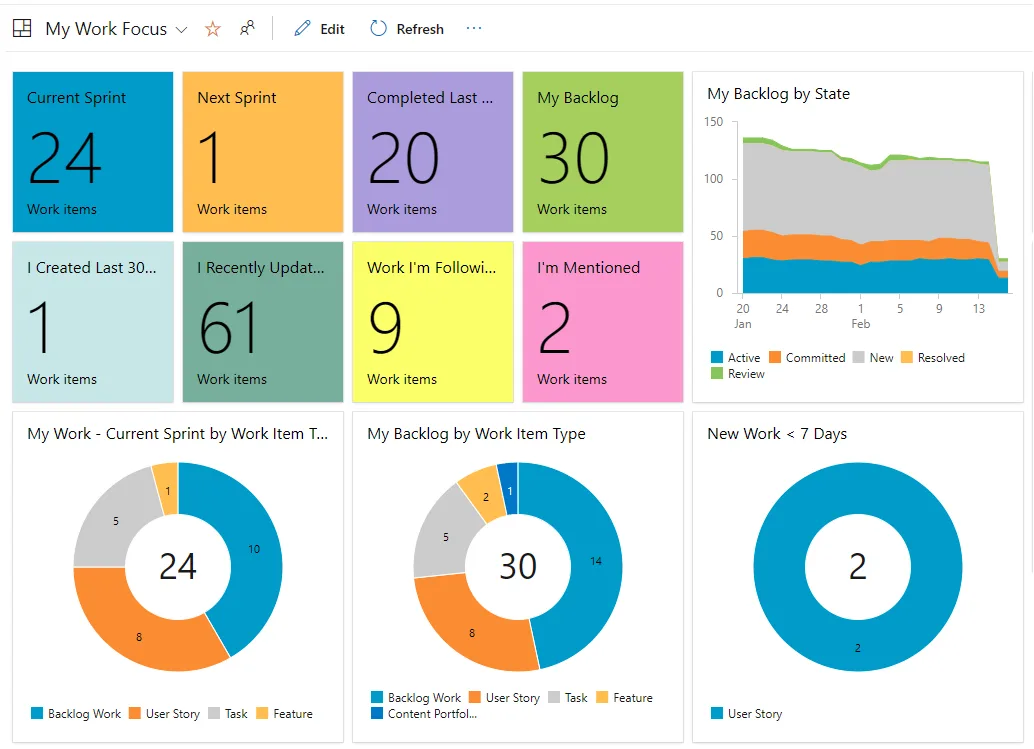
Azure DevOps dashboard 2026

Azure DevOps Explained in Practical Terms

Azure DevOps explained in simple words is a platform that helps teams plan, build, test, and release software in a controlled and automated way. However, it is not just a tool. Instead, it is a complete environment that connects developers, testers, and operations teams.

If you look at real projects in 2026, you will see faster release cycles, automation everywhere, and strong collaboration between teams. Therefore, Azure DevOps for cloud professionals becomes a strategic layer that sits above Azure infrastructure and plays a major role in shaping a successful cloud computing career in 2026.

So when someone asks What is Azure DevOps beginner guide, the real answer is this. It is a structured way to manage the entire software lifecycle using Microsoft tools and automation practices.

Azure DevOps SDLC Overview

Before going deeper, let us understand the Azure DevOps SDLC overview.

Every software project follows stages. First planning. Then coding. After that testing. Finally deployment and monitoring. However, in traditional setups these stages often work in silos.

DevOps lifecycle continuous loop diagram

Azure DevOps services overview shows how these stages connect in one place. As a result, teams avoid confusion, manual errors, and release delays.

Therefore, Azure DevOps workflow explained includes:

  • Work tracking

  • Version control

  • Build automation

  • Release pipelines

  • Test management

Because everything stays integrated, visibility improves across the organization.

Azure DevOps Components and Features

Now let us break down Azure DevOps components and features in detail.

1. Azure Boards

Azure DevOps boards and repos guide often starts with Boards. Boards help manage tasks, bugs, user stories, and sprint planning. However, it is not just a ticket tool. Instead, it connects work items directly to code and builds.

Therefore, managers and engineers see progress clearly.

2. Azure Repos

Azure DevOps version control with Repos allows teams to manage Git repositories securely. It supports branching strategies, pull requests, and code reviews. Because version control is central to DevOps, this feature becomes critical.

Azure DevOps boards and repos guide shows how linking commits to work items improves traceability.

3. Azure Pipelines

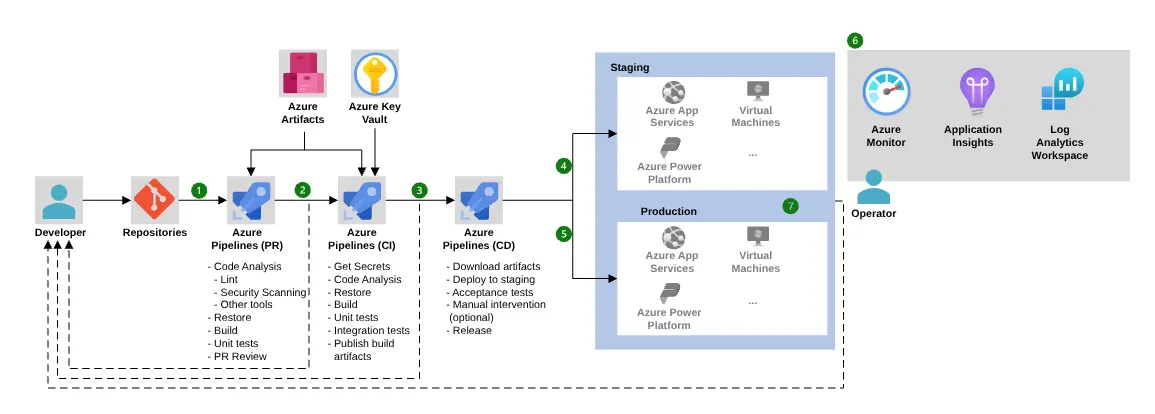
Azure DevOps CI/CD pipelines basics focus on automation. Pipelines build code, run tests, and deploy applications automatically. Therefore, manual deployment risks reduce significantly.

In Azure DevOps tutorial 2026, pipelines support container builds, Kubernetes deployments, and multi stage releases, similar to what an OpenShift administrator does in real job environments. As cloud native architecture grows, automation becomes mandatory.

4. Azure Test Plans

Testing is often ignored. However, Azure DevOps components and features include structured testing tools that support manual and automated tests.

5. Azure Artifacts

Artifacts manage package feeds and dependencies. Therefore, teams maintain version consistency.

Together, these tools form the Azure DevOps services overview.

What is Azure DevOps components diagram

Azure DevOps CI/CD Pipelines Basics

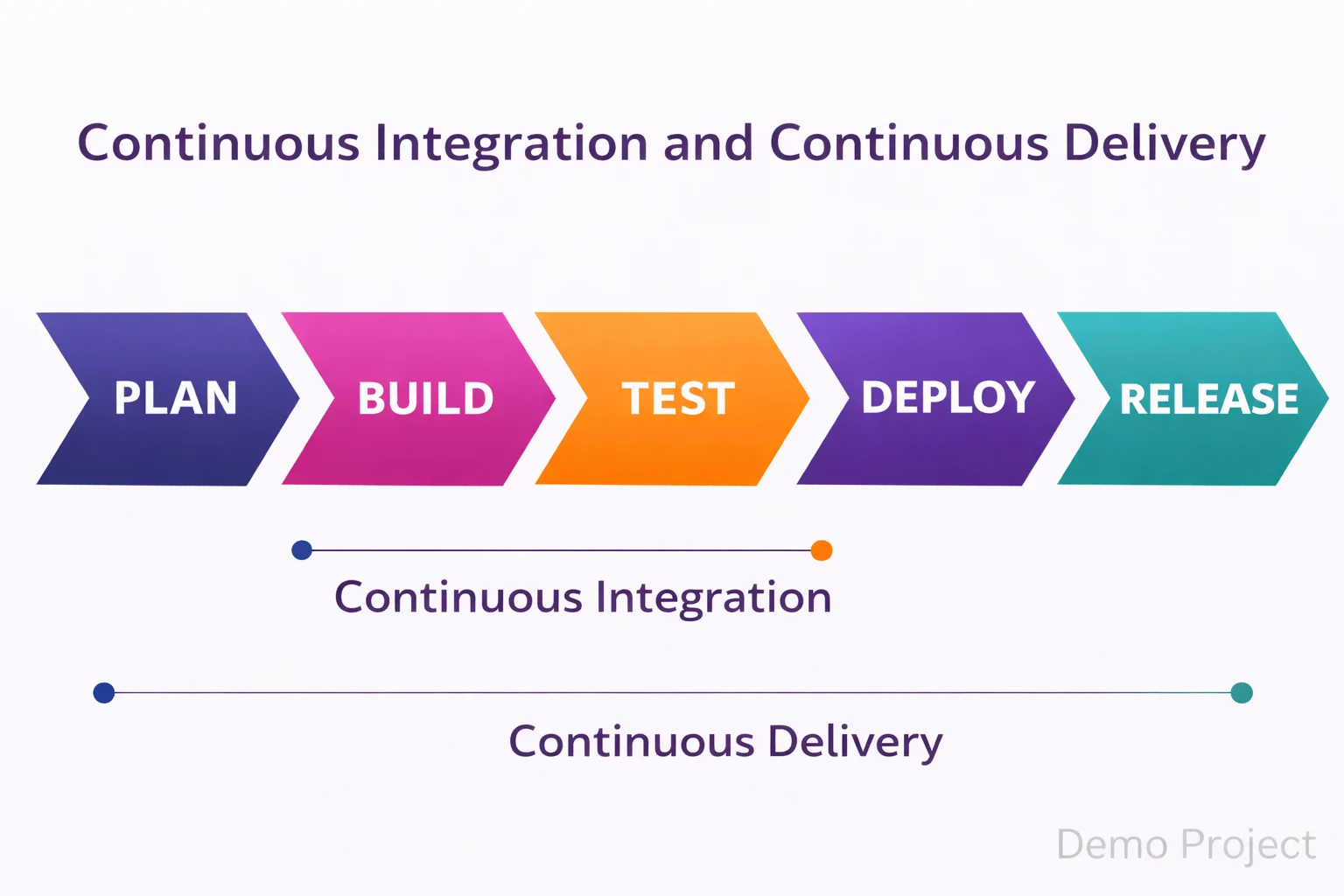
CI means continuous integration. CD means continuous delivery. However, in practice it means small code changes get tested and deployed automatically.

Azure DevOps CI/CD pipelines basics allow:

  • Automated build triggers

  • Test execution on every commit

  • Staged deployment approvals

  • Rollback strategies

Because of this automation, deployment fear reduces. Therefore, release frequency increases.

In this What is Azure DevOps beginner guide, understanding CI/CD is central. Without pipelines, DevOps remains theory.

Continuous integration continuous delivery flow

Azure DevOps Project Setup Guide

Now let us discuss Azure DevOps project setup guide from a real implementation view.

First, create an organization. Then create a project. After that configure Boards and Repos. Next, define branching strategy. Finally, set up pipelines.

Azure DevOps step by step guide usually follows this order:

  1. Create project

  2. Import or create repository

  3. Configure build pipeline

  4. Add release pipeline

  5. Connect environments

Because each step connects to the next, workflow becomes structured.

Azure DevOps Workflow Explained

Azure DevOps workflow explained in simple flow:

Idea to Board item
Board item to Code commit
Code commit to Pipeline
Pipeline to Deployment
Deployment to Monitoring

Therefore, visibility stays end to end.

Azure DevOps tools checklist for professionals should include:

  • Git strategy defined

  • Branch protection rules

  • Automated testing enabled

  • Multi environment pipelines

  • Security scanning

Azure DevOps vs DevOps Differences

Many professionals confuse Azure DevOps vs DevOps differences.

DevOps is a culture and methodology. However, Azure DevOps is a platform that supports DevOps practices.

Therefore, DevOps can exist without Azure DevOps. But Azure DevOps helps implement DevOps properly using structured tools.

Understanding Azure DevOps vs DevOps differences prevents conceptual confusion.

Azure DevOps Benefits for Professionals

Azure DevOps benefits for professionals go beyond automation.

First, improved collaboration.
Second, faster releases.
Third, audit visibility.
Fourth, career growth.

Azure DevOps key advantages 2026 include strong integration with cloud native stacks, container ecosystems, and hybrid cloud deployments.

Therefore, Azure DevOps for cloud professionals becomes a career multiplier.

How to Get Started with Azure DevOps

If you are thinking about how to get started with Azure DevOps, follow this practical path.

Start with Azure DevOps tutorial 2026 hands on labs. Then build a simple CI/CD pipeline. After that integrate it with Azure App Service or Kubernetes. If you are confused about orchestration platforms, this OpenShift vs Kubernetes beginner guide helps clarify the differences. Finally, experiment with approval gates and release stages.

Azure DevOps beginner tips include:

  • Start small with one project

  • Use YAML pipelines

  • Implement branch policies

  • Track deployment metrics

Because practical exposure builds clarity, theory alone is not enough.

Azure DevOps Best Practices

Azure DevOps best practices help avoid common mistakes.

Use infrastructure as code and follow strong declarative resource management concepts to ensure predictable deployments.
Keep pipelines modular.
Implement least privilege access.
Review pull requests properly.
Monitor build performance.

Azure DevOps workflow explained becomes powerful only when discipline exists.

Azure DevOps Certification Guide AZ-400

For career growth, Azure DevOps certification guide AZ-400 is relevant. This certification focuses on designing DevOps strategy, implementing CI/CD, managing source control, and security integration.

However, certification without real practice does not help. Therefore, combine learning with live projects.

Azure DevOps Key Advantages 2026

In 2026, speed matters. However, stability matters more. Azure DevOps key advantages 2026 include automation reliability, audit compliance, and enterprise grade integration.

Therefore, What is Azure DevOps beginner guide is not just a definition article. Instead, it is a strategic shift for professionals who want structured software delivery.

About KR Network Cloud

KR Network Cloud is a leading IT training institute that provides practical cloud and DevOps training programs aligned with industry needs. The focus remains on real implementation, live project exposure, and certification readiness. Therefore, professionals who want structured guidance in Azure DevOps for cloud professionals can benefit from hands on learning designed for real career growth.

Conclusion

So, what is Azure DevOps beginner guide truly about?

It is about connecting planning, coding, testing, and deployment into one smooth system. It is about removing manual steps. It is about improving collaboration. Most importantly, it is about building reliable CI/CD pipelines that support modern cloud applications.

If you already understand Azure infrastructure, then Azure DevOps becomes your next logical upgrade. Therefore, start small, build pipelines, follow best practices, and move toward structured delivery.

That is how you move from cloud user to delivery architect.

Red Hat Ansible (RHCE) Career in 2026!

Introduction

Today, the IT industry is moving fast toward automation. Earlier, system administrators managed servers manually. However, now companies prefer automation because it saves time, reduces errors, and improves performance.

Because of this change, RHCE (Red Hat Certified Engineer – EX294) has become one of the most valuable certifications in Linux and automation.

If you are planning to start or grow your IT career in 2026, RHCE with Ansible can be a strong choice.

What is Ansible (RHCE)?

Red Hat Ansible (RHCE)

RHCE EX294 is a certification from Red Hat. It focuses on automation using Red Hat Ansible Automation Platform.

In simple words, Ansible is a tool that helps you automate:

  • Server configuration
  • Software installation
  • User management
  • Security updates
  • Application deployment

Instead of doing tasks manually on each server, you write automation playbooks. As a result, the same task runs on hundreds of servers in minutes.

Therefore, RHCE proves that you can manage and automate Linux infrastructure professionally.

How Red Hat Ansible Helps in IT Industry

Automation is now required in almost every IT company.

For example:

  • Companies manage large data centers
  • Cloud environments run thousands of servers
  • DevOps teams need fast deployments

Because of this, companies prefer engineers who can automate repetitive tasks.

In addition:

  • Automation reduces human mistakes
  • It improves system consistency
  • It saves operational cost

So, RHCE makes you more valuable compared to a traditional Linux administrator.

Demand of Ansible in 2026

RHCE Training
RHCE Training

The demand for automation engineers is increasing every year.

Industries using Red Hat and Ansible include:

  • Banking
  • Telecom
  • Healthcare
  • Government
  • Cloud service providers

Moreover, automation is now part of DevOps culture.

Common job roles after learning Ansible and clearing RHCE (EX294) certification:

  • Linux Automation Engineer
  • DevOps Engineer
  • Infrastructure Engineer
  • Cloud Operations Engineer
  • Site Reliability Engineer

Because companies want faster deployment and stable systems, automation skills remain highly demanded in 2026.

How to Learn Ansible (Step-by-Step Approach)

RH294
EX294

If you want to build a strong career with Ansible (RHCE), follow this path:

Step 1: Build Linux Fundamentals

You must be comfortable with:

  • Linux command line
  • File permissions
  • User and group management
  • Services and storage
  • Basic networking

Step 2: Clear RHCSA First

Before RHCE training and certification, you must complete the Red Hat Certified System Administrator (RHCSA).

RHCSA builds your Linux foundation. Without it, automation concepts may feel confusing.

Step 3: Start Ansible Learning

Then focus on:

  • Writing playbooks
  • Managing inventories
  • Using variables
  • Creating roles
  • Troubleshooting errors

Step 4: Practice Labs Regularly

Since EX294 is a performance-based exam, practice is very important. Therefore, hands-on labs are the key to success.

Certifications Before and After RHCE

Before RHCE:

  • RHCSA (Mandatory)

After RHCE:

To grow further, you can move to:

  • Red Hat OpenShift (Container & Kubernetes)
  • Cloud certifications (AWS, Azure, GCP)
  • DevOps tools (Docker, Kubernetes, CI/CD)

As a result, RHCE becomes a bridge between Linux Administration and DevOps/Cloud roles.

Best Practices After Getting a Job

Getting certified is only the beginning. After getting a job:

  • Continue improving automation scripts
  • Learn Infrastructure as Code concepts
  • Work on real-world deployment pipelines
  • Understand cloud integration
  • Improve troubleshooting skills

Most importantly, never stop learning. Technology keeps evolving.

Career Profiles You Can Grow Into

With experience, you can move into:

  • Senior DevOps Engineer
  • Automation Architect
  • Cloud Architect
  • Platform Engineer
  • Site Reliability Engineer (SRE)

Therefore, RHCE opens long-term growth opportunities, not just entry-level roles.

Is RHCE Aligned with Future Technologies?

Yes, absolutely. Automation connects directly with:

  • Cloud computing
  • DevOps
  • Containerization
  • CI/CD pipelines
  • Infrastructure as Code

Because modern IT depends on automation, RHCE skills remain relevant for future technologies as well.

Why Choose KR Network Cloud – Red Hat Authorized Training Partner

KR Network Cloud is a Red Hat Authorized Training Partner in India.

Training benefits include:

  • Structured lab-based sessions
  • Real-time troubleshooting practice
  • Exam-oriented tasks
  • Industry-experienced trainers

Therefore, students do not just prepare for certification, they prepare for real job roles.

If you are serious about building a career in Linux automation, practical learning makes a big difference.

FAQs About RHCE Career

1. Is Ansible good for freshers?

Yes, but first complete RHCSA and build strong Linux basics.

2. Is Ansible difficult?

It is practical and performance-based. However, with proper lab practice, it is manageable.

3. Does Red Hat Ansible (RHCE) guarantee a job?

No certification guarantees a job. However, strong skills and hands-on practice improve job opportunities.

4. What salary can I expect after clearing RHCE certification?

Salary depends on skills, location, and experience. However, automation engineers generally earn more than traditional Linux admins.

5. Is Ansible automation useful for DevOps roles?

Yes. Since DevOps focuses on automation, RHCE aligns very well with DevOps jobs.

6. What should I learn after Red Hat Ansible (RHCE)?

You can learn OpenShift, Kubernetes, cloud platforms, and CI/CD tools.

7. Is Ansible Automation relevant in 2026 and beyond?

Yes. Because automation is growing rapidly, RHCE remains relevant for future IT careers.

8. How long does it take to prepare for RHCE certification?

Usually, 2-4 months with consistent practice, depending on your Linux background.

Final Conclusion

If your goal is to build a stable and future-ready IT career, RHCE (Red Hat Ansible) is a strong choice in 2026.

It not only improves your Linux automation skills but also prepares you for DevOps and cloud-based roles.

However, remember this: certification opens the door, but practical knowledge builds your career.

If you focus on strong fundamentals, hands-on labs, and continuous learning, RHCE can become a powerful career path for you.

Why Linux System admin is a Good Career in 2026!

Red Hat Certified System Administrator (RHCSA)

Linux runs many important systems in the IT world. Banks, hospitals, telecom companies, and big IT firms use Linux servers to run their work. One of the most trusted Linux systems is Red Hat Enterprise Linux (RHEL).

The Red Hat Certified System Administrator (RHCSA) certification proves that you can manage RHEL systems in real work situations.

In 2026, companies are using more cloud, automation, and containers. All of these need Linux knowledge. That is why RHCSA is a good starting point for a career in system administration, cloud, or DevOps.

But is RHCSA really worth your time and money in 2026? Let us understand in simple words.

ChatGPT Image Feb 23 2026 04 48 31 PM

Demand of RHCSA Training

Many companies use Red Hat systems in their offices and data centers. Government offices and large companies also prefer RHEL because it is stable and secure.

In job websites across India, Middle East, Europe, and USA, you will often see jobs like:

  • Linux System Administrator
  • Technical Support Engineer (L2/L3)
  • Cloud Support Engineer
  • DevOps Engineer
  • Infrastructure Engineer

ChatGPT Image Feb 23 2026 04 52 57 PM

Most of these jobs ask for Linux skills. Many of them prefer RHCSA certification.

Salary Expectation in 2026 after RHCSA Certification

In India:

  • Freshers with RHCSA: ₹3.5-6 LPA
  • 3-5 years experience: ₹8-12 LPA

In the USA:

  • Mid-level administrators earn between $75,000-$110,000 per year

One big reason companies like RHCSA is because the exam is practical. You must work on a real system during the exam. It is not a simple multiple-choice test. This makes companies trust certified people more.

Major Cloud Platforms in Industry

Linux and cloud go together. Most cloud servers run on Linux. If you know RHCSA, you can work easily on cloud platforms.

Amazon Web Services (AWS)

AWS is the biggest cloud platform in the world. Many virtual machines on AWS use Linux.
RHCSA skills like user management, storage setup, and service control are very useful in AWS.

Microsoft Azure

Azure also supports Linux servers, including RHEL.
Many companies use both on-premise servers and Azure cloud. RHCSA helps manage these Linux systems smoothly.

Google Cloud Platform (GCP)

GCP is popular for containers and Kubernetes.
Before learning Kubernetes, you must understand Linux basics. RHCSA gives that strong base.

Before Learning RHCSA

ChatGPT Image Feb 23 2026 04 57 32 PM

RHCSA is good for beginners, but you should know some basics:

  • Basic computer knowledge
  • Simple networking ideas
  • Basic command line usage

If you are from a non-IT background, you can still learn. But you may need extra practice.

How Much Time Is Needed?

  • Working professionals: 2 to 3 months with daily practice
  • Students with Linux knowledge: maybe less

The exam is fully practical. Only reading theory will not help. You must practice in labs daily.

Also, think about your goal:

  • Want to move into Cloud or DevOps? RHCSA is very helpful.
  • Want to go into programming only? Linux knowledge helps, but certification may not be required.

Certifications After RHCSA

RHCSA is the first step in the Red Hat path.

After that, you can go for:

  • Red Hat Certified Engineer (RHCE)
  • Red Hat Specialist certifications
  • OpenShift certifications

RHCE focuses more on automation using Ansible. This is very useful for DevOps jobs.

You can also combine RHCSA with cloud certifications like:

  • AWS Solutions Architect
  • Azure Administrator

This combination increases job chances.

Remember: Certification alone is not enough. Practice and real experience are also very important.

Importance of Online Learning and Labs

Linux cannot be learned by reading only. You must practice commands again and again.

Good online training should give:

  • Live lab practice
  • Real troubleshooting examples
  • Storage and user management practice
  • Service configuration
  • Boot issue fixing

Cloud labs are helpful for working people who do not have physical servers at home.

The more you practice, the more confident you become.

Why Choose KR Network Cloud

KR Network Cloud focuses on practical training. Classes are not only theory-based. Students work on real lab systems.

Training includes:

  • Live system configuration
  • Real error fixing
  • Storage and service management
  • Mock interviews
  • Career guidance

Flexible batch timings help working professionals. Recorded sessions help students revise topics again.

They also guide students who want to move from Linux support roles to cloud or DevOps roles.

FAQs

1. Is RHCSA hard for beginners?

It is not very hard, but it needs regular practice. Daily lab work makes it easier.

2. Does RHCSA expire?

Yes. Red Hat certifications are valid for about 3 years.

3. Can I get a job with only RHCSA?

Yes, especially for entry-level Linux or support roles. Internship experience helps more.

4. Is RHCSA useful in 2026 with automation growing?

Yes. Automation works on top of Linux systems. You must understand Linux first before automating it.

5. How long does preparation take?

Usually 2 to 4 months with regular practice.

Final Words

In 2026, Linux is still very important in IT. Cloud, DevOps, and automation all depend on it. RHCSA is a strong starting point for anyone who wants a career in system administration or cloud.

If you practice well and build real skills, RHCSA can open many job opportunities for you.

It is a practical certification, trusted by companies, and still very relevant in 2026.

Why Cloud Computing is a Good Career in 2026!

Introduction

Cloud computing is no longer a small or special IT skill. It is now a basic need for companies of all sizes. Small startups, online stores, banks, hospitals, and big global companies all use cloud services to run their apps and store data.

In 2026, cloud computing is still a strong and growing career option. Many students, IT workers, and even people from non-IT fields want to know: Is cloud computing still a good career in 2026?

The simple answer is yes. But your success depends on your skills, practice, and learning plan.

Demand for Cloud Computing in 2026

Many companies are moving from physical servers to cloud platforms. This helps them:

  • Save money
  • Work faster
  • Manage data easily
  • Support remote work
  • Run apps smoothly

Because of this shift, cloud professionals are in high demand.

Industries hiring cloud professionals:

  • Banking and fintech
  • Healthcare companies
  • E-commerce websites
  • EdTech companies
  • Government projects
  • Media and streaming platforms

Popular job roles:

  • Cloud Engineer
  • Cloud Architect
  • DevOps Engineer
  • Cloud Security Specialist
  • Site Reliability Engineer (SRE)
  • Cloud Network Engineer

Cloud jobs are available in almost every industry.

Salary in India (2026 Estimates)

Cloud computing is one of the highest paying IT fields.

  • Entry-level cloud engineer: ₹5-8 LPA
  • Mid-level (3-6 years experience): ₹12-20 LPA
  • Senior engineer or cloud architect: ₹25-40 LPA

In countries like the US, Europe, and the Middle East, salaries are even higher.

Companies depend on cloud systems daily. That is why they pay well for skilled professionals.

Core Prerequisites

  • Strong Linux / Windows Server basics
  • Solid Networking knowledge (TCP/IP, DNS, Subnetting, Firewalls)
  • Understanding of Virtualization & Storage

Major Cloud Platforms in the Industry

ChatGPT Image Feb 22 2026 05 07 40 PM


Three main cloud platforms are popular in the world:

Amazon Web Services (AWS)
Amazon Web Services (AWS) is the most used cloud platform. It started in 2006. AWS gives services like:

  • Virtual servers
  • Storage
  • Databases
  • Networking
  • AI tools

Many startups and big companies use AWS.

Microsoft Azure

Microsoft Azure is popular in large companies. It works very well with:

  • Windows Server
  • Active Directory
  • Microsoft Office 365

Many government and enterprise projects prefer Azure.

Google Cloud Platform (GCP)

Google Cloud Platform (GCP) is known for:

  • Data analytics
  • AI and machine learning
  • Kubernetes

Companies working with big data and AI often choose GCP.

👉 It is better to learn one platform deeply instead of learning all three at the same time.

What to Learn Before Starting Cloud

Many beginners directly start cloud services without basics. This creates problems later.

Before learning cloud, understand:

  • Networking basics (IP, DNS, TCP/IP)
  • Linux basics
  • Simple scripting (Bash or Python)
  • Virtual machines
  • Database basics
  • Basic security

Cloud is built on networking and system knowledge. If basics are weak, advanced topics will be hard.

Even non-IT students can learn cloud. The first few months may feel difficult, but regular practice helps.

Certifications

Certifications help you:

  • Learn in a structured way
  • Improve your resume
  • Get interview calls

Popular certifications:

  • AWS Certified Solutions Architect – Associate
  • AWS Certified Developer
  • Azure Administrator (AZ-104)
  • Google Associate Cloud Engineer
  • Certified Kubernetes Administrator (CKA)

But remember:

Certification alone will not get you a job.
Practical projects are more important.

A good learning path:

  • Learn basics
  • Practice in labs
  • Build small projects
  • Do certification
  • Apply for internships or junior jobs

Cloud certifications must be renewed every few years. This keeps you updated.

Importance of Practice and Labs

WhatsApp Image 2026 02 22 at 5.08.49 PM

Cloud cannot be learned only by watching videos.

You must practice:

  • Launching virtual machines
  • Deploying websites
  • Setting up storage
  • Creating IAM users
  • Configuring load balancers
  • Building CI/CD pipelines
  • Working with Kubernetes

Free-tier cloud accounts allow you to practice at home.

Making mistakes during practice helps you learn faster.

Why Choose KR Network Cloud for Training

KR Network Cloud offers:

  • Practical training with real examples
  • Courses on AWS, Azure, GCP, DevOps, Linux, networking
  • Experienced trainers
  • Doubt clearing sessions
  • Certification exam preparation
  • Good student reviews

In simple words, we provide practical and job-focused training with strong support.

Future Scope of Cloud Computing

Cloud computing will continue growing after 2026.

Important future trends:

  • Serverless computing
  • Multi-cloud systems
  • Edge computing
  • AI with cloud
  • Cloud security
  • Green cloud systems

Many companies now use more than one cloud platform. This is called multi-cloud.

Cloud security jobs are also growing fast because data protection is very important.

Tools like:

  • Terraform
  • Ansible
  • Kubernetes

are becoming common skills for cloud professionals.

Cloud will not disappear. It will only grow and improve.

FAQs

1. Is cloud computing crowded in 2026?

Entry-level jobs have competition. But skilled and experienced people are still in high demand.

2. Can non-IT students learn cloud?

Yes. Focus on networking and Linux basics first.

3. How long does it take to become job-ready?

With regular study and practice, 6-12 months is enough for beginner roles.

4. Which cloud platform should I start with?

AWS is widely used. Azure is good for enterprise jobs. Choose based on your goal.

5. Do I need coding for cloud?

Basic scripting is needed. Heavy coding is not required unless you choose DevOps or development.

6. Is cloud computing a long-term career?

Yes. Cloud systems will always be needed. Skills may change, but demand will remain strong.

ChatGPT Image Feb 22 2026 04 57 48 PM

Final Words

Cloud computing is a strong and safe career choice in 2026. It offers:

  • Good salary
  • Many job options
  • Long-term growth
  • Global opportunities

If you build strong basics, practice regularly, and keep learning new tools, cloud computing can give you a stable and high-paying career.

What an OpenShift Administrator Actually Does on the Job

What an OpenShift Administrator Actually Does on the real job

Daily Responsibilities Inside IT Companies

An OpenShift administrator’s day does not begin with large architectural decisions. Instead, it usually begins with checking whether the platform is behaving the same way it did yesterday. In most cases, cluster health, node status, operator conditions, and alerts collectively form the background noise of the role. As a result, this work consistently sits at the intersection of OpenShift administration and ongoing operational vigilance.

At the same time, routine tasks tend to repeat, though rarely in a predictable order. For example, patching nodes, monitoring resource utilization, validating backups, and reviewing certificate expiry timelines are all common activities. Individually, none of these appear complex. However, in practice, they frequently overlap with live deployments, active users, and internal deadlines. Consequently, this is where formal OpenShift training often begins to diverge from operational reality.

An administrator trained through Red Hat OpenShift training typically understands how to execute commands correctly. However, on the job, the more critical challenge is determining when to execute them. In reality, a cluster rarely exists in a neutral state. Instead, something is almost always running, waiting, or partially failing, which continuously influences operational decision-making.

Typical daily responsibilities include:

  • Monitoring cluster and node health through the OpenShift console and CLI
  • Managing upgrades and patches with awareness of application dependencies
  • Handling storage, networking, and ingress-related issues as they arise
  • Supporting development teams with platform-level problems
  • Coordinating with security teams on compliance and access controls

These responsibilities are not sequential. They interrupt one another.

Learning Labs Versus Production Work

Most OpenShift courses are structured around clean environments. Labs start empty, commands succeed, and resources behave as expected. This is necessary for learning, but it creates a misleading sense of control.

Production environments are rarely empty. Namespaces already exist. Operators have histories. Configuration drift is common. An administrator working after completing an OpenShift certification quickly learns that production work is less about knowing what to do and more about understanding what not to touch at a given moment.

Key differences between labs and real environments often include:

  • Multiple teams deploying simultaneously
  • Partial failures where systems remain technically “up”
  • Legacy configurations that no one fully owns anymore
  • Business constraints overriding technical preferences

A Red Hat Certified OpenShift Administrator course prepares candidates to understand components. It does not simulate organizational pressure, competing priorities, or incomplete documentation. That gap becomes apparent early.

Interaction With Developers

Developers interact with OpenShift daily, even if they do not consciously think about the platform itself. However, when something breaks, the administrator becomes the first escalation point. In most cases, the conversation usually starts with application symptoms and then slowly moves toward platform behavior.

In practice, some developers understand containers deeply. Others, by contrast, treat OpenShift as infrastructure that should resemble traditional servers. As a result, the administrator adjusts language accordingly, switching between platform concepts and more practical explanations.

Common interaction points include:

  • Pod restarts, crash loops, and failed deployments
  • Resource limits and requests causing throttling
  • Image pull failures or registry access issues
  • Networking and route misconfigurations

This interaction is not purely technical. It involves expectation management. The administrator often explains why certain behaviors are inherent to the platform, not errors. OpenShift administration in this context becomes a translation role.

Incident Handling Expectations

Incidents rarely align with textbook definitions. Instead, alerts are often vague, while symptoms evolve over time. Consequently, the OpenShift administrator’s first task becomes determining whether the issue is platform-wide or isolated. To support this assessment, metrics, events, and logs are consulted, frequently under significant time pressure.

During incidents, administrators are therefore expected to:

  • First, identify whether OpenShift components are contributing to the issue

  • Next, restore service without introducing additional instability

  • Simultaneously, communicate clearly with multiple teams at the same time

However, despite the expectation of speed, restraint remains critical. Acting too quickly can, in fact, amplify existing problems. Training environments, by contrast, rarely emphasize this balance. In real operations, incident handling reinforces this lesson repeatedly.

Ultimately, an OpenShift course explains how components work. By comparison, incident response demonstrates how those same components fail.

Responsibilities Beyond the Console

Not all OpenShift administration happens inside the CLI. Documentation, informal runbooks, and internal notes play a quiet but critical role. These are rarely polished documents. They evolve from repeated incidents and small discoveries.

Administrators also spend time coordinating:

  • Upgrade schedules across teams
  • Access requests and permission reviews
  • Cross-cluster consistency in multi-cluster setups

As environments scale, the role shifts slightly. Automation increases, but so does the need for governance. A certified administrator often becomes a reference point for platform decisions, even when those decisions are not strictly technical.

Career Growth After OpenShift Certification

Completing OpenShift certification or a Red Hat Certified OpenShift Administrator course does not define a single career path. It signals platform competency. What follows depends on context and interest.

Common directions include:

  • Platform engineering and internal tooling
  • Cloud infrastructure and hybrid deployments
  • Security-focused roles aligned with container platforms
  • Reliability or operations leadership roles

Some professionals remain deeply focused on OpenShift administration. Others, however, treat it as a foundational layer. In this context, Red Hat OpenShift training provides credibility, but experience ultimately determines progression.

After certification, there is often a period of ambiguity. During this phase, the title may remain the same while responsibilities continue to expand. Over time, the administrator gradually moves from execution toward decision-making, sometimes without any formal change in role.

The Ongoing Nature of the Role

An OpenShift environment never feels finished. Platform versions change. APIs deprecate. Organizational expectations evolve. Administrators track updates, but not every change becomes visible until it causes friction.

The distinction between learning and working persists. Labs remain references. Production remains unpredictable. An OpenShift course may explain how something should behave. Daily work reveals how it actually behaves.

The role sits between stability and change, rarely resolving into one or the other.

OpenShift vs Kubernetes: What Beginners Need to Understand

Why Container Orchestration Exists in the First Place

Containers feel simple when viewed in isolation. Running a single container on a single machine rarely raises difficult questions. The situation changes the moment containers start operating as a group, which is usually when teams begin evaluating orchestration OpenShift platforms or enrolling in formal training to understand how coordination works at scale.

Once applications are spread across multiple nodes, new problems appear simultaneously:

  • multiple workloads competing for the same resources

  • containers restarting without warning

  • network paths behaving differently under load

  • data needing to survive restarts, rescheduling, and failures

At this stage, manual control stops scaling. Something has to continuously decide where workloads run, how failures are handled, and how components remain connected. This is the point where orchestration becomes unavoidable, regardless of whether the environment adopts a raw upstream platform or a managed Openshift enterprise distribution.

People usually encounter Kubernetes or begin searching for Red Hat OpenShift training not because orchestration removes complexity, but because it prevents complexity from becoming unmanageable. The problems do not disappear. They are reorganized and handled systematically.

What Red Hat OpenShift was introduced?

Kubernetes as the Foundation

Kubernetes defines the core model used by modern container platforms Kubernetes clusters, including enterprise distributions that appear later in administration-focused roles. Its central idea is simple but strict: the system continuously compares what should be running with what is running and tries to close the gap.

Instead of issuing step-by-step instructions, you describe a desired state. The control plane repeatedly attempts to make the environment match that description, whether it is running standalone or underneath an enterprise platform used in certification labs.

Key building blocks include:

  • Pods as the smallest schedulable unit

  • Services for stable network access

  • Controllers and Deployments for lifecycle management

What matters more than the object names is the behavior behind them. The system does not reason or plan in a human way. It loops, retries, and reconciles state. This reconciliation model remains unchanged even when the same mechanics are consumed indirectly through Red Hat certification programs.

For many beginners, this model feels abstract. It exposes primitives rather than workflows. That abstraction is often why learners, after initial exposure, move toward a structured platform course to gain more guided operational context.

How the Enterprise Platform Relates to Kubernetes

The enterprise distribution does not replace Kubernetes. It runs the upstream project at its core and builds additional layers around it, which is a foundational concept in any Red Hat certified OpenShift administrator course.

The upstream API remains available, but the platform shapes how the environment behaves by providing defaults and integrated services, including:

  • centralized authentication and authorization

  • a built-in container image registry

  • opinionated networking and ingress behavior

  • platform-level monitoring and logging

For someone evaluating Red Hat OpenShift training, the key distinction is this: the platform is not simply “upstream plus tools.” It is the same orchestration engine operating inside a governed system with enforced conventions, which directly influences day-to-day administration tasks.

Architectural Differences That Matter Early

Upstream Kubernetes behaves like a toolkit. It gives you the components and expects you to decide how to assemble them. Many decisions are intentionally left open, which is why self-managed environments often demand deeper platform engineering skills.

The enterprise distribution behaves more like a pre-assembled system:

  • core services are already integrated

  • platform components are version-aligned

  • operational boundaries are enforced early

For newcomers to platform administration, this reduces early ambiguity. The trade-off is reduced freedom. Whether that trade is positive or negative often depends on the environment, which beginners rarely understand at the start of their training journey.

Installation and Setup Expectations

Openshift Installation approaches vary widely in upstream environments kubernetes clusters. Lightweight clusters can be created quickly, while production-grade deployments demand careful design and ongoing operational discipline.

The enterprise platform is consistently stricter, which becomes very clear in a Red Hat certified administrator course:

  • infrastructure prerequisites are tightly defined

  • supported installation paths are enforced

  • deviations from standard patterns are discouraged

This is often the first moment when learners realize that predictability is prioritized over speed. Initial setup takes longer, but post-installation behavior is usually more consistent, aligning with enterprise certification goals.

Target Users and Learning Orientation

Upstream environments often attract users who want to design their own platform layer and understand every moving part. The enterprise distribution targets teams that prefer standardized operational patterns supported by vendor-backed tooling.

Beginners sometimes assume this platform is only for advanced engineers. In practice, the structured environment can make learning easier, especially in formal training programs. The constraints reduce decision fatigue early on and help learners focus on operational outcomes rather than platform assembly.

As understanding deepens, those same constraints become more visible and sometimes limiting, particularly for engineers transitioning from general orchestration work into formal administration roles.

Developer Experience and Daily Interaction

Upstream usage assumes heavy command-line interaction and YAML-driven workflows. Feedback loops are indirect. Changes are applied first, then observed.

The openshift containers enterprise platform changes this dynamic by providing a web console that surfaces:

  • deployment and rollout status

  • logs and events

  • application routes and exposure

In Red Hat OpenShift training, the console often accelerates understanding. It does not eliminate the need for CLI skills, but it changes how learners form mental models of the system, which is relevant for both certification and real operational environments.

Security Defaults in Practice

Upstream defaults are relatively permissive. The enterprise distribution applies restrictive defaults by design, which is a recurring theme in administration roles.

This difference appears quickly:

  • containers run with limited privileges

  • user permissions are narrowly scoped

  • some container images fail without modification

Applications that run without issue upstream may fail under stricter controls. This is often described as friction. In practice, it exposes assumptions that were previously unexamined. Security is not an add-on here. It is baseline behavior, which is why this topic appears frequently in Red Hat certification objectives.

Networking and Application Exposure

Upstream environments commonly expose applications through Ingress resources. Actual behavior depends heavily on the chosen controller, which introduces variation across environments.

The enterprise platform introduces Routes:

  • application exposure follows a consistent model

  • TLS handling is standardized

  • defaults favor platform control

For those pursuing Red Hat certification, Routes are not just convenience objects. They reflect a specific networking philosophy that differs from generic ingress patterns.

Storage and Persistent Workloads

In Openshift upstream setups, persistent storage depends on external providers. The abstraction is consistent, but real-world behavior often is not, especially across cloud and on-prem environments.

The enterprise distribution integrates storage workflows more tightly in supported environments:

  • storage classes are aligned with the platform

  • common provisioning paths are simplified

This does not remove complexity. It shifts where that complexity lives. In many course lab environments, this standardization reduces friction even though production systems remain complex.

Tooling and Ecosystem Shape

The upstream ecosystem is broad and rapidly evolving. The enterprise platform curates a smaller subset and integrates it deeply, which is reflected clearly in Red Hat training materials.

This shapes how people learn:

  • upstream usage encourages experimentation and choice

  • the enterprise approach emphasizes consistency and repeatability

Formal Red Hat certified administrator course content reflects this by guiding learners through selected tools rather than asking them to evaluate an entire ecosystem.

Red Hat OpenShift Operations and Day-Two Responsibilities

The deepest differences emerge during ongoing operations. Upstream environments often require continuous decisions around upgrades, monitoring, and logging, placing significant responsibility on the operator.

The enterprise platform centralizes many of these concerns:

  • controlled upgrade paths

  • integrated monitoring and logging

  • predictable lifecycle management

These operational responsibilities are central to platform administration and heavily emphasized in certification-focused learning paths.

OpenShift Cost and Platform Trade-offs

Upstream software itself has no licensing cost, but operational overhead can be substantial. The enterprise distribution introduces licensing costs while potentially reducing operational risk.

The difference is not free versus paid. It is about where cost becomes visible and how much responsibility is shifted to the platform vendor, a topic often discussed during Red Hat training.

Common Beginner Misconceptions

Two assumptions frequently fail in practice:

  • learning the enterprise platform bypasses upstream fundamentals

  • upstream knowledge transfers without friction

Both break down over time. Certification paths address this directly by assuming upstream knowledge while interpreting it through platform constraints.

How Red Hat OpenShift Learning Typically Progresses

Learning rarely follows a straight line. Many practitioners encounter upstream orchestration first, move to structured enterprise training, then return with clearer questions.

This cycle reflects how understanding develops: concepts first, structure next, and deeper reasoning afterward, which is exactly what most platform courses and Red Hat certified OpenShift administrator curricula are designed to support.