Azure DevOps vs GitHub: What’s the Difference for Beginners?
- KR NETWORK CLOUD
- February 25, 2026
Azure DevOps vs GitHub: What’s the Difference for Beginners?
If you are starting your DevOps journey, one question appears almost immediately. which one should you learn first?
At first glance, both look similar. Both manage code. Both support automation. Both are owned by Microsoft. However, once you start exploring real projects, you begin to see clear differences.
Therefore, this Azure DevOps vs GitHub guide will break everything down in simple terms.
Instead of pushing one tool, we will focus on clarity. Because beginners do not need hype. They need direction.
Why Azure DevOps vs GitHub Confuses Beginners
Many aspiring DevOps engineers understand Git basics. Some even use cloud platforms. However, when they search Azure DevOps vs GitHub comparison 2026, they see technical blogs full of jargon.
As a result, confusion increases.
So let us simplify the difference between Azure DevOps and GitHub using practical context.
Imagine you are joining a startup. You mainly push code, create pull requests, and run simple automation. In that case, GitHub may feel natural.
Now imagine you are joining a large corporate IT company. There are sprint boards, approval flows, compliance checks, and structured releases. In that case, Azure DevOps may fit better.
That is the first practical difference.
What is Azure DevOps?
Azure DevOps is a complete DevOps platform. If you want a deeper foundational explanation, this detailed guide on what is azure devops beginner guide 2026 explains how the platform fits into modern CI/CD environments. It includes tools for planning, coding, testing, and releasing software.
When we talk about Azure DevOps vs GitHub features explained, Azure DevOps includes:
- Azure Boards for project tracking
- Azure Repos for version control
- Azure Pipelines for automation
- Azure Test Plans
- Azure Artifacts
Because everything is integrated, enterprise teams prefer structured workflows.
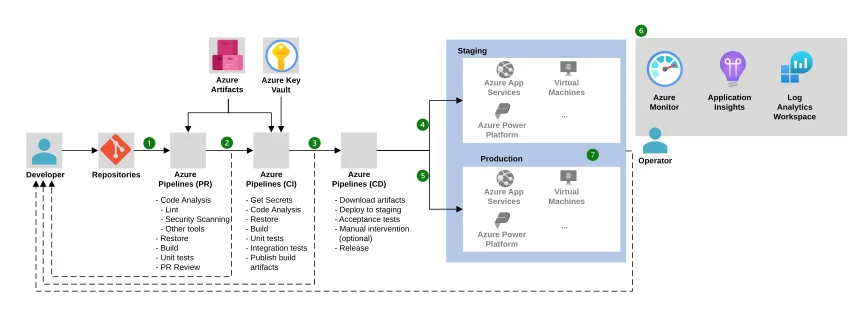
Therefore, in Azure DevOps vs GitHub project management, Azure DevOps clearly offers deeper control.
What is GitHub?
GitHub started as a code hosting platform. Over time, it added automation, collaboration, and security tools.
GitHub can be understood as a developer first platform. It focuses on:
- Git based repositories
- Pull requests and reviews
- Open source collaboration
- Automation through GitHub Actions
Because it feels lightweight, Azure DevOps vs GitHub for beginners often leans toward GitHub at the early stage.
However, that does not mean it is less powerful.
Azure DevOps vs GitHub Version Control Differences
Let us begin with source control.
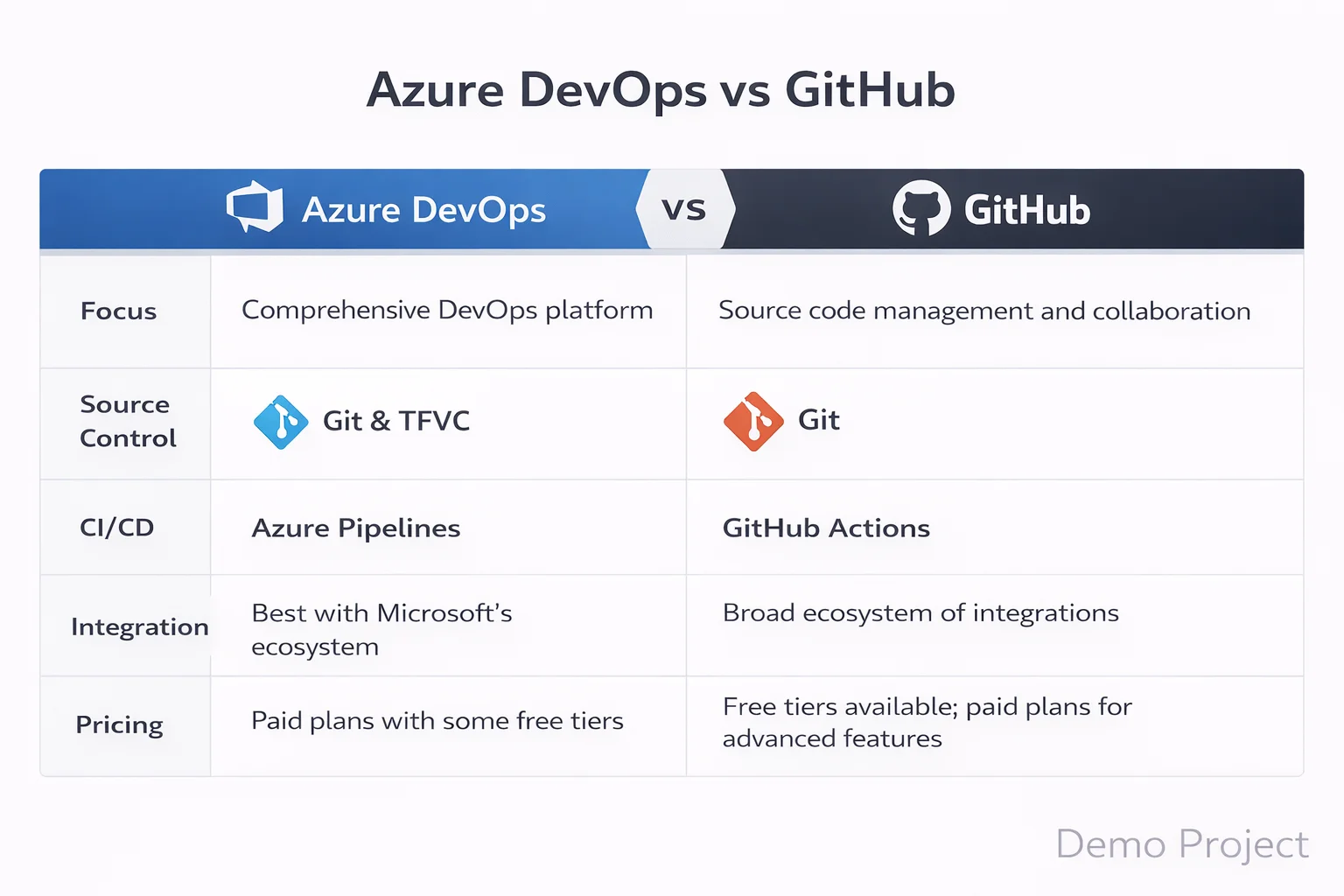
In Azure DevOps vs GitHub version control differences, both use Git. However, Azure DevOps also supports TFVC, which some legacy enterprises still use.
Therefore, if you aim for enterprise IT roles, Professionals may require understanding Azure Repos.
If you aim for enterprise IT roles, professionals may require understanding Azure Repos along with strong fundamentals covered in linux system admin in 2026
On the other hand, GitHub is fully Git based and widely used in open source communities.
For most beginners, GitHub feels easier. However, enterprise teams may expect Azure DevOps knowledge.
Azure DevOps vs GitHub CI/CD Comparison
Automation is central to DevOps.
Automation is central to DevOps. Infrastructure automation tools such as those discussed in red-hat-ansible-in-2026 also play a major role in enterprise DevOps environments.
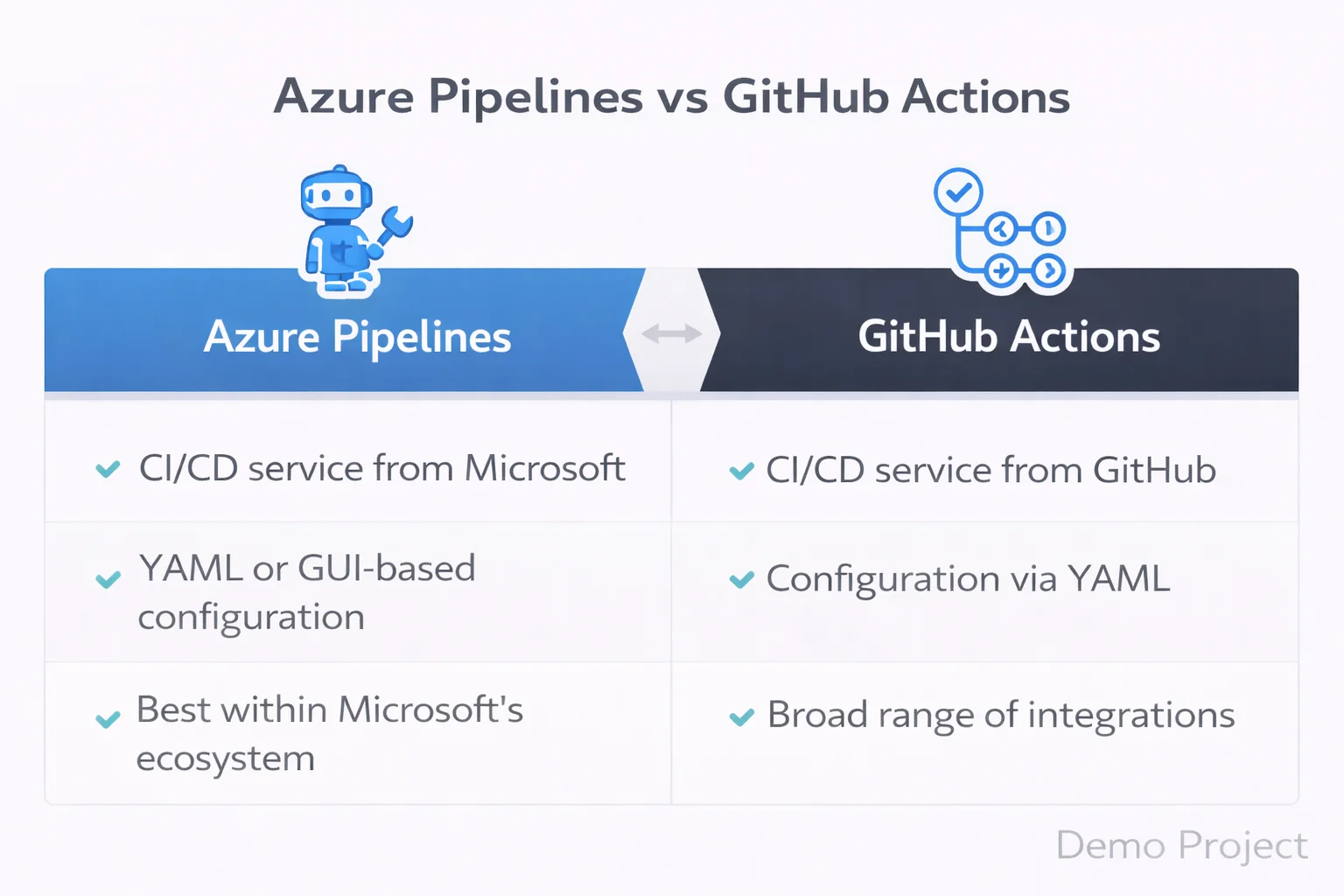
In Azure DevOps vs GitHub CI/CD comparison, Azure DevOps uses Azure Pipelines. GitHub uses GitHub Actions.
Azure Pipelines offer advanced customization, multi stage approvals, and complex enterprise workflows.
GitHub Actions, however, are simpler to start. They use YAML files and marketplace actions.
So in Azure and CI/CD pipelines comparison, beginners often find GitHub Actions easier to configure first.
However, in large companies, Azure DevOps pipelines may provide more granular control.
Azure DevOps vs GitHub Actions
Many beginners confuse Azure DevOps vs GitHub actions.
GitHub Actions is the automation engine inside GitHub. Azure DevOps pipelines serve a similar purpose.
If you want quick automation for a personal project, GitHub Actions work well.
If you need deep enterprise release management, Azure Pipelines may offer stronger structure.
Therefore, Azure DevOps vs GitHub vs GitHub Actions becomes a discussion about scale and control.
Azure DevOps vs GitHub Project Management
Project management is where a big difference appears.
Azure DevOps includes advanced Agile boards, sprint planning, backlog tracking, and reporting.
GitHub provides project boards, but they are simpler.
So in Azure DevOps vs GitHub project management, Azure DevOps clearly targets enterprise Agile environments.
If you plan to work in structured corporate IT, this matters.
Azure DevOps vs GitHub Security and Scalability
Security is not optional anymore.
In this security and scalability, both platforms provide enterprise level features. However, Azure DevOps often integrates deeply with Microsoft identity systems.
Meanwhile, GitHub provides strong security scanning and secret detection.
Therefore, the difference between Azure DevOps and GitHub here depends on your company ecosystem.
If your company runs heavily on Microsoft Azure, Azure DevOps may integrate more smoothly.
Azure DevOps vs GitHub Workflows
Let us look at daily workflows.
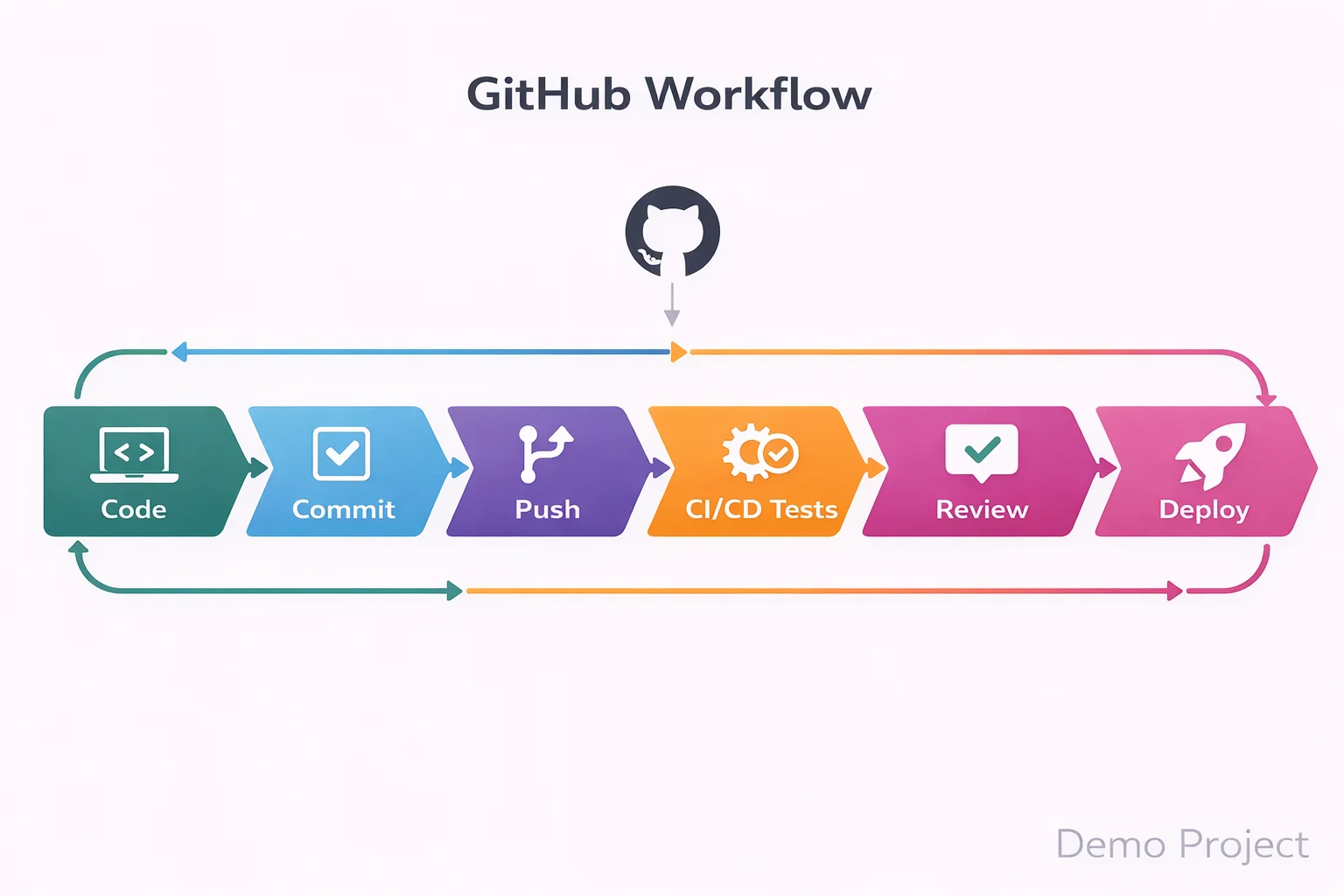
In workflows, GitHub feels developer centered. Developers push code, open pull requests, and trigger automation quickly.
Azure DevOps workflows often involve structured approvals, QA checks, and staged releases.
So Azure DevOps vs GitHub use cases differ based on team size.
Startups prefer speed and simplicity. Enterprises prefer control and compliance.
Enterprises prefer control and compliance, similar to responsibilities explained in what-an-openshift-administrator-does-real-job where structured DevOps workflows are essential.
Azure DevOps vs GitHub Pros and Cons
Now let us summarize Azure DevOps vs GitHub pros and cons clearly.
Azure DevOps pros:
- Strong enterprise project management
- Advanced pipeline customization
- Deep Azure ecosystem integration
Azure DevOps cons:
- Slightly steeper learning curve
- Interface feels heavier for small teams
GitHub pros:
- Simple interface
- Strong open source ecosystem
- Easy CI/CD setup
GitHub cons:
- Limited enterprise Agile tools compared to Azure DevOps
Therefore, Azure DevOps vs GitHub benefits depend on career direction.
Therefore, it benefits depend on career direction, especially if you are planning a long term cloud-computing-career-in-2026
Azure DevOps vs GitHub for Beginners
If you are new to DevOps, Azure DevOps vs GitHub for beginners depends on your comfort level.
If you already know Git and want quick hands on experience, GitHub may feel smoother.
However, if you aim for corporate DevOps roles, Azure DevOps vs GitHub for professionals may push you toward Azure DevOps learning.
So instead of asking which is better, ask where you want to work.
Azure DevOps vs GitHub Comparison 2026
In 2026, automation is expected. CI/CD is standard. Cloud native deployment is normal.
Both tools are mature. Both support modern DevOps practices. The difference between Azure DevOps and GitHub lies in structure, scale, and workflow style.
Azure DevOps vs GitHub Tutorial Perspective
From a learning perspective, tutorial paths differ.
GitHub tutorials often focus on:
- Repository creation
- Pull requests
- GitHub Actions
Azure DevOps tutorials often focus on:
- Boards configuration
- Repository management
- Pipeline design
- Release stages
So your learning journey changes depending on platform.
Which One is Better for a DevOps Career?
Let us answer the real question.
For open source exposure and fast experimentation, GitHub is excellent.
For enterprise IT environments and structured DevOps processes, Azure DevOps may align better.
However, many companies use both together.
Therefore, it should not be treated as a rivalry. Instead, think of it as complementary skills.
Listening to Microsoft Azure DevOps podcast with deepen your knowledge for a better understanding
About KR Network Cloud
KR Network Cloud is a leading IT training institute that provides practical DevOps and cloud training aligned with industry needs. The focus is on hands on learning, real pipeline setup, and structured project experience. As a result, beginners who want clarity in Azure DevOps vs GitHub decisions can gain guided exposure to both platforms in a practical learning environment.
Final Verdict
So what is the final answer in Azure DevOps vs GitHub?
There is no universal winner.
If your goal is startup culture, open source, and lightweight automation, GitHub may be your starting point.
If your goal is enterprise DevOps roles, structured CI/CD pipelines, and Azure ecosystem integration, Azure DevOps may give stronger alignment.
However, the smartest move for beginners in 2026 is simple.
Start with one. Understand the workflows. Then learn the other.
Because in real DevOps careers, flexibility wins.
1) Which one should I learn first, Azure DevOps or GitHub?
If you are completely new to DevOps, start with GitHub.
GitHub helps you understand Git version control, repositories, branching strategies, pull requests, and basic CI/CD using GitHub Actions. These are core DevOps fundamentals. Without strong Git knowledge, learning Azure DevOps pipelines can feel confusing.
Once you are comfortable with Git workflows and automation basics, move to Azure DevOps. Azure DevOps introduces structured tools like Azure Boards, Azure Repos, and Azure Pipelines, which are widely used in enterprise DevOps environments.
The smart learning order is Git fundamentals, then GitHub workflows, then CI/CD basics, then Azure DevOps.
2) Does learning Azure DevOps vs GitHub affect my job opportunities?
Yes, but the impact depends on the type of company you are targeting.
Startups and product companies commonly use GitHub and GitHub Actions for CI/CD. Large enterprises and corporate IT environments often use Azure DevOps for structured release management, sprint planning, and approval workflows.
Recruiters care more about your understanding of DevOps concepts like CI/CD pipelines, version control, automation, and deployment strategies than the tool itself. However, having Azure DevOps experience can strengthen your profile for enterprise roles.
So the difference between Azure DevOps and GitHub becomes important when aligning with your career direction.
3) What do real companies actually use, Azure DevOps or GitHub?
In real-world environments, many companies use both.
It is common to see code hosted on GitHub while using Azure Pipelines for CI/CD. Some teams manage sprint planning and backlog tracking in Azure DevOps Boards while developers collaborate on GitHub repositories.
Enterprise organizations prefer Azure DevOps because it provides structured project management and governance controls. Startups often prefer GitHub because it is lightweight and developer focused.
The choice depends on team size, process maturity, and compliance requirements.
4) Can I get a DevOps job by knowing only GitHub?
At entry level, yes.
If you can manage repositories, create branches, raise pull requests, and configure CI/CD using GitHub Actions, you are already demonstrating practical DevOps skills.
However, as you move toward mid-level or enterprise DevOps roles, knowledge of Azure DevOps, especially Azure Pipelines and Azure Boards, becomes valuable.
GitHub can help you start your DevOps career. Expanding into Azure DevOps strengthens long-term growth.
5) Is it necessary to learn both Azure DevOps and GitHub?
You do not need to learn both at the beginning. Focus on mastering one platform properly.
Over time, learning both GitHub and Azure DevOps increases your flexibility as a DevOps engineer. Once you understand version control, CI/CD workflows, and deployment strategies, switching between tools becomes much easier.
DevOps careers are built on workflow understanding, not tool loyalty. If you understand the concepts deeply, Azure DevOps and GitHub become interchangeable skills rather than confusing choices.